
 E-Paper



I ditched my laptop for the OnePlus Pad 3: Here’s why I might not go back
Can a tablet truly replace your laptop? I spent weeks using the OnePlus Pad 3 for work, gaming, and travel and here’s how it worked out for me.

 Prefer HTon Google


You may be interested in

4% OFF
OnePlus Pad 3 World's Fastest Snapdragon 8 Elite Processor, 13.2" 3.4k Screen, 144Hz Adaptive Refresh Rate, 8 Speakers, OnePlus AI, 12140 mAh Battery, 12 GB RAM + 256 GB ROM WiFi, Storm Blue
 OnePlus Pad 3 World's Fastest Snapdragon 8 Elite Processor
- 13.2" 3.4k Screen
- 144Hz Adaptive Refresh Rate

₹47,999
₹49,999Check Details
4% OFF
OnePlus Pad 3 World's Fastest Snapdragon 8 Elite Processor, 13.2" 3.4k Screen, 144Hz Adaptive Refresh Rate, 8 Speakers, OnePlus AI, 12140 mAh Battery, 16 GB RAM + 512 GB ROM WiFi, Storm Blue
- OnePlus Pad 3 World's Fastest Snapdragon 8 Elite Processor
- 13.2" 3.4k Screen
- 144Hz Adaptive Refresh Rate
₹52,999
₹54,999Check Details
4% OFF
OnePlus Pad 3 World's Fastest Snapdragon 8 Elite Processor, 13.2" 3.4k Screen, 144Hz Adaptive Refresh Rate, 8 Speakers, OnePlus AI, 12140 mAh Battery, 12 GB RAM + 256 GB ROM WiFi, Frosted Silver
- OnePlus Pad 3 World's Fastest Snapdragon 8 Elite Processor
- 13.2" 3.4k Screen
- 144Hz Adaptive Refresh Rate
₹47,999
₹49,999Check Details
28% OFF

OnePlus Pad Lite with Biggest Battery in Segment 9340 mAh, 11"(27.94 cm) Display with 500 nits Brightness & 11 Hrs of Video Playback, 8GB RAM 128GB Storage, LTE, Aero Blue
- OnePlus Pad Lite with Biggest Battery in Segment 9340 mAh
- 11"(27.94 cm) Display with 500 nits Brightness & 11 Hrs of Video Playback
- 8GB RAM 128GB Storage
₹17,999
₹24,999Check Details
5% OFF

OnePlus Pad 3 World's Fastest Snapdragon 8 Elite Processor, 13.2" 3.4k Screen, 144Hz Adaptive Refresh Rate, 8 Speakers + Kaspersky Plus 1 Device 1 Year (Physical Pack)
- OnePlus Pad 3 World's Fastest Snapdragon 8 Elite Processor
- 13.2" 3.4k Screen
- 144Hz Adaptive Refresh Rate
₹48,473
₹50,857Check Details
OnePlus Pad 3 review: Smartphones keep getting bigger. Laptops keep getting lighter and slimmer. And tablets? They’re still stuck in a strangely misunderstood middle ground. Yet for many of us, they’ve quietly become the screen we turn to the most, whether it’s binge-watching shows, casual gaming, jotting down notes, or even handling serious work on the go.
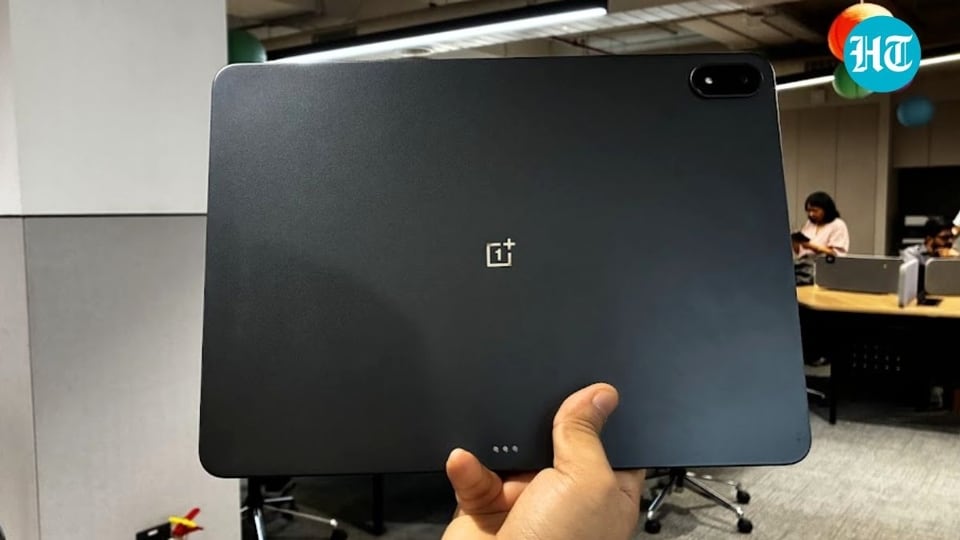

The recently launched OnePlus Pad 3, which I’ve been using for the past one and a half months, aims to blur the lines between laptop-level performance and mobile-level convenience. It features a big 13.2-inch display with a 7:5 aspect ratio, is powered by the Snapdragon 8 Elite chipset, and packs a 12,140mAh battery with 80W SuperVOOC fast charging to keep you powered throughout the day.
Priced at Rs. 47,999 for the 12GB RAM + 256GB storage model and Rs. 52,999 for the 16GB RAM + 512GB storage variant, the OnePlus Pad 3 sounds promising on paper.
But specs on paper rarely tell the full story. I’ve pushed this Android tablet through streaming marathons, gaming sessions, and work deadlines to see if it can truly hold up as a daily companion. In this detailed review, we’ll find out whether the OnePlus Pad 3 deserves a spot in your bag or if spending on a low-budget laptop will be a smart choice.
OnePlus Pad 3 Review: Sleek, Smart, and Almost Perfect Design
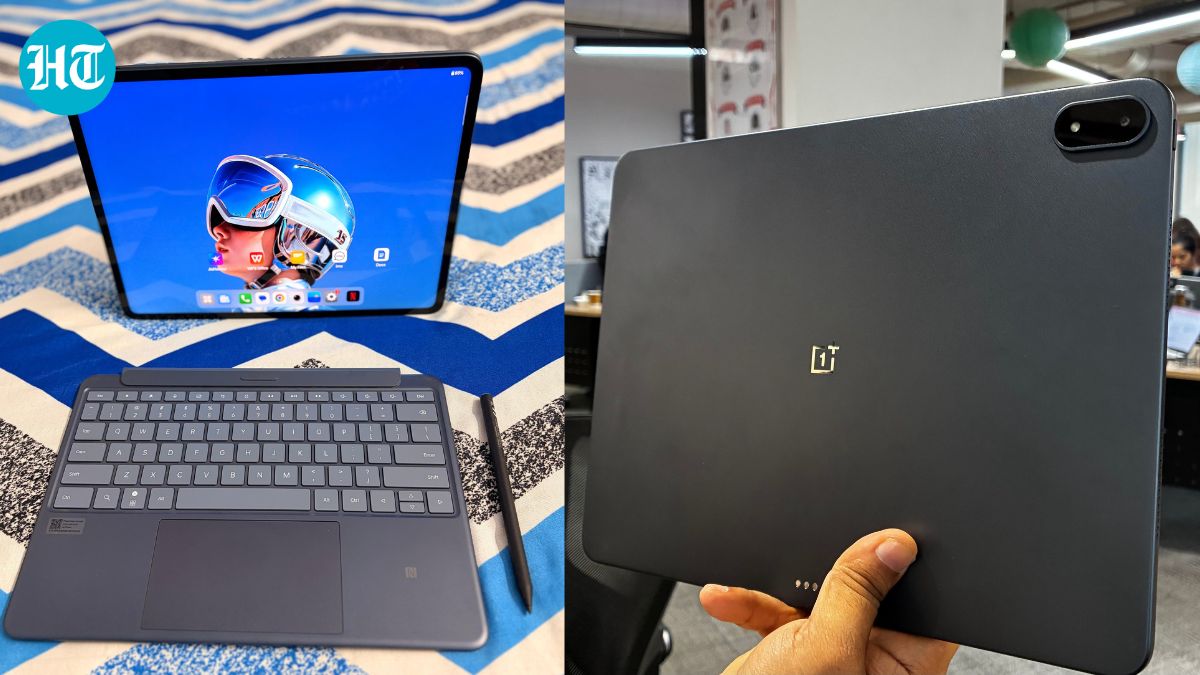
There’s something undeniably satisfying about unboxing a gadget that looks like it belongs in the future, and the OnePlus Pad 3 nails that first impression. The moment you lift it out of the box, its impossibly slim frame makes you pause. At just 5.8mm thick, this tablet feels featherlight yet remarkably sturdy, thanks to its aluminium body that’s both cool and premium to the touch. It’s the kind of device that instantly elevates your desk setup, or your confidence in a meeting.
OnePlus has fine-tuned its design philosophy here, blending elegance with practicality. The tablet weighs only 675 g, making it comfortable to hold even with the Smart Keyboard attached.
However, the design doesn’t exactly turn heads. The OnePlus Pad 3 is available in two colour options: Frosted Silver and Storm Blue, and I got the latter one for review, which leans closer to grey than the bold blue as its name suggests. While it’s sleek, it lacks the pop of colour or creative flair that rivals like Apple’s entry-level iPad offer. The all-metal back also attracts smudges far too easily, which dulls its otherwise polished appearance.
Also read: OnePlus 13s review: The minimalist powerhouse
On the other hand, the ‘Smart Keyboard’ accessory, while convenient, feels like an afterthought. The keys have a slightly soft, “mushy” feedback, and the material underneath offers little grip, which causes it to slide during typing sessions. It’s functional but not quite refined. On the plus side, the physical buttons are well-placed and responsive, which makes day-to-day use effortless. The only real letdown is the audio, which doesn’t quite deliver the crispness you’d expect at this price point. Still, with its sharp build and thoughtful design, the OnePlus Pad 3 proves that sophistication can come in a slender, stylish package.
OnePlus Pad 3 Review: A Big and Stunning Display That Steals the Show
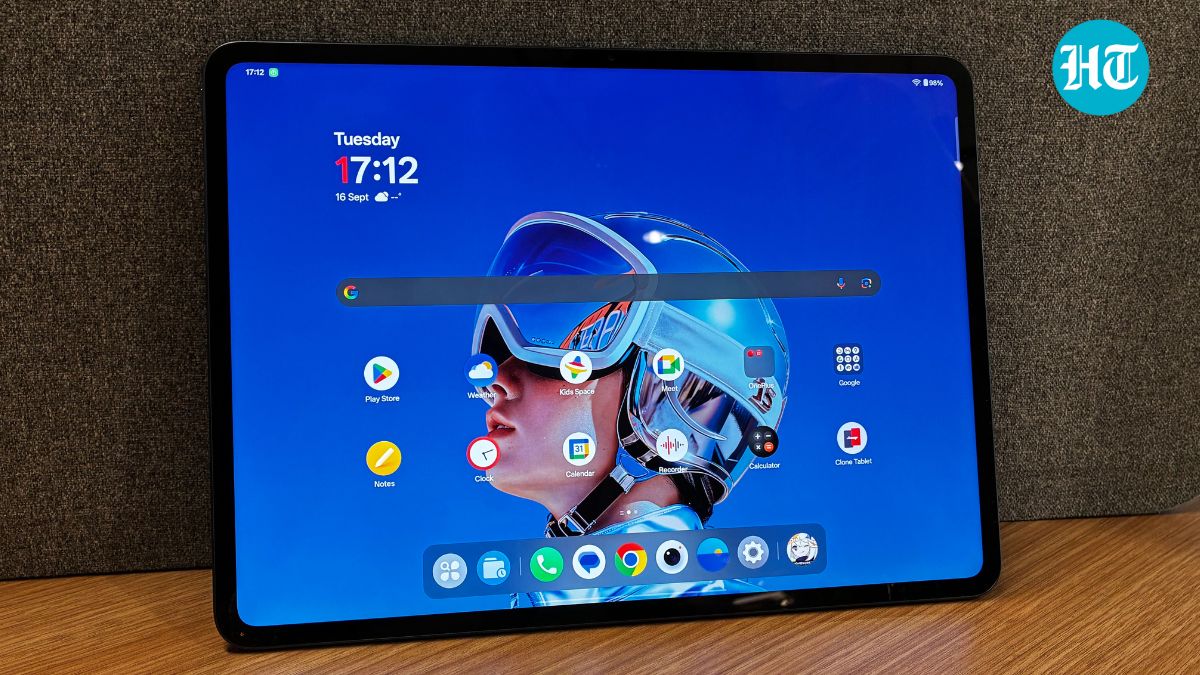
Every once in a while, a gadget comes along that surprises you, not because it tries too hard, but because it gets one thing so perfectly right that you can’t stop thinking about it. For the OnePlus Pad 3, that magic lies in its display. If this tablet had a heartbeat, it would be pulsing through its 13.2-inch, 3.4K LCD screen.
At first glance, the choice of LCD over AMOLED might raise an eyebrow. But give it a moment, and this 12-bit, 3,392 x 2,400 panel wins you over effortlessly. The adaptive 144Hz refresh rate ensures every scroll, swipe, and gesture feels like liquid motion, while 900 nits of brightness make everything pop even under strong light. It’s not an exaggeration to say that this display spoils you; every other screen you use afterwards feels like a step backwards.
The secret behind that silky smooth performance is LTPO (Low-Temperature Polycrystalline Oxide) technology. It’s what lets the screen dance between 1Hz and 144Hz, depending on what you’re doing, racing to keep up with your games or slowing down when you’re simply reading. It’s fast when you need it to be, calm when you don’t, and incredibly efficient at managing power in between.
Also read: Sony ULT Tower 9AC review: Loud, flashy, and impossible to ignore - worth it?

Then there’s the Dolby Vision HDR support, which turns movie nights and Netflix binges into a cinematic treat. Paired with an eight-speaker setup that produces clear, rich audio, the Pad 3 transforms into an entertainment powerhouse.
But beyond its visual brilliance, what truly impressed me was its 7:5 aspect ratio. It feels natural whether you’re streaming a show, editing documents, or juggling multiple windows. There’s enough vertical space to make productivity easy without feeling cramped, a small detail that makes a huge difference when you’re working or travelling.
After spending time with the OnePlus Pad 3, I’ve realised it’s more than just a tablet - it’s a device that bridges work and play seamlessly. Whether it’s your travel companion or your entertainment hub, its display alone makes it hard to put down.
OnePlus Pad 3 Review: Smart Keyboard and Other Accessories
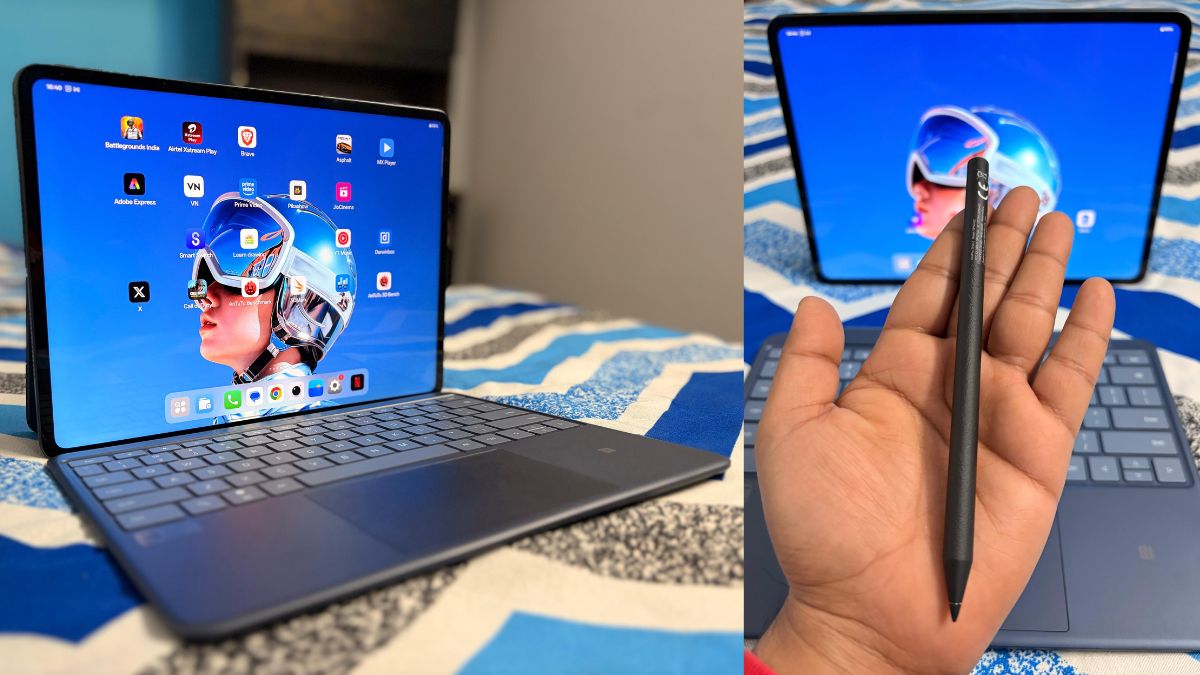
The OnePlus Pad 3 Smart Keyboard might look like a sleek add-on at first, but once you start using it, the charm begins to fade. It’s made of plastic yet feels premium enough to match the tablet’s design, giving it a neat, laptop-style appeal. However, the moment you attach it, the setup feels noticeably heavier, not ideal if portability is your priority.
Typing on it is a mixed experience. The keys are well-spaced and soft to the touch, but they lack the crisp, clicky feedback you’d expect at this price. The trackpad, on the other hand, performs well. It’s smooth, responsive, and supports multi-finger gestures that make navigation easier. Sadly, the missing backlight makes working in low light a chore.
The real issue, though, lies in its magnetic attachments. The keyboard connects via pogo pins and a detachable backplate that doubles as a kickstand. Unfortunately, the magnets feel weak, and even a slight movement can make the setup come apart. It’s frustrating, especially when you’re trying to move the tablet around while it’s propped up.
Despite its polished design, the OnePlus Smart Keyboard feels more like a work in progress than a must-have accessory. It gets the basics right but lacks the refinement and sturdiness that would make it a truly reliable companion for the OnePlus Pad 3.
Also read: OnePlus Nord 5 review: Best 5G mobile under ₹35,000?
OnePlus Pad 3 Review: Performance and Software
There’s something oddly satisfying about a gadget that just works, no fuss, no slowdowns, no drama. That’s exactly how the OnePlus Pad 3 feels after spending over a month with it. It’s not just a tablet trying to impress; it’s one that quietly wins you over with sheer performance and thoughtful software.
Under the hood, the OnePlus Pad 3 is powered by Qualcomm’s Snapdragon 8 Elite processor, the same top-tier chipset you’ll find in flagship smartphones. This translates to effortless speed, whether you’re editing videos, juggling multiple apps, or gaming for hours. The device comes in two configurations: 12GB RAM with 256GB of storage, or a beefier 16GB RAM paired with 512GB storage, and it handled everything I threw at it without hesitation.
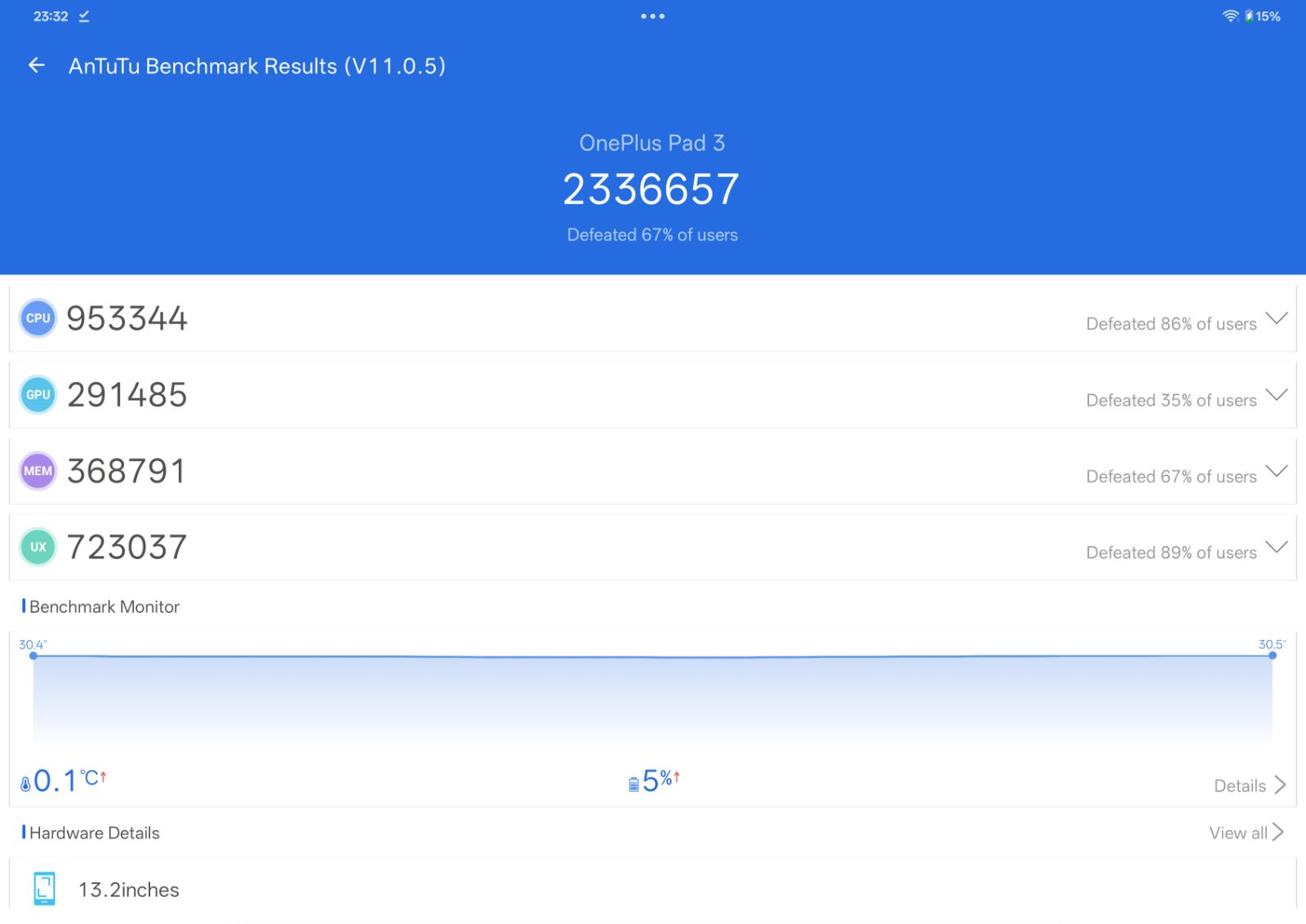

The benchmark results back this up, with Antutu scores easily crossing 2.34 million. On Geekbench 6, it achieved 3,048 and 9,404 in the single- and multi-core tests, respectively, while the 3DMark Wild Life Extreme Stress Test showed an impressive stability rate of 84.6%.
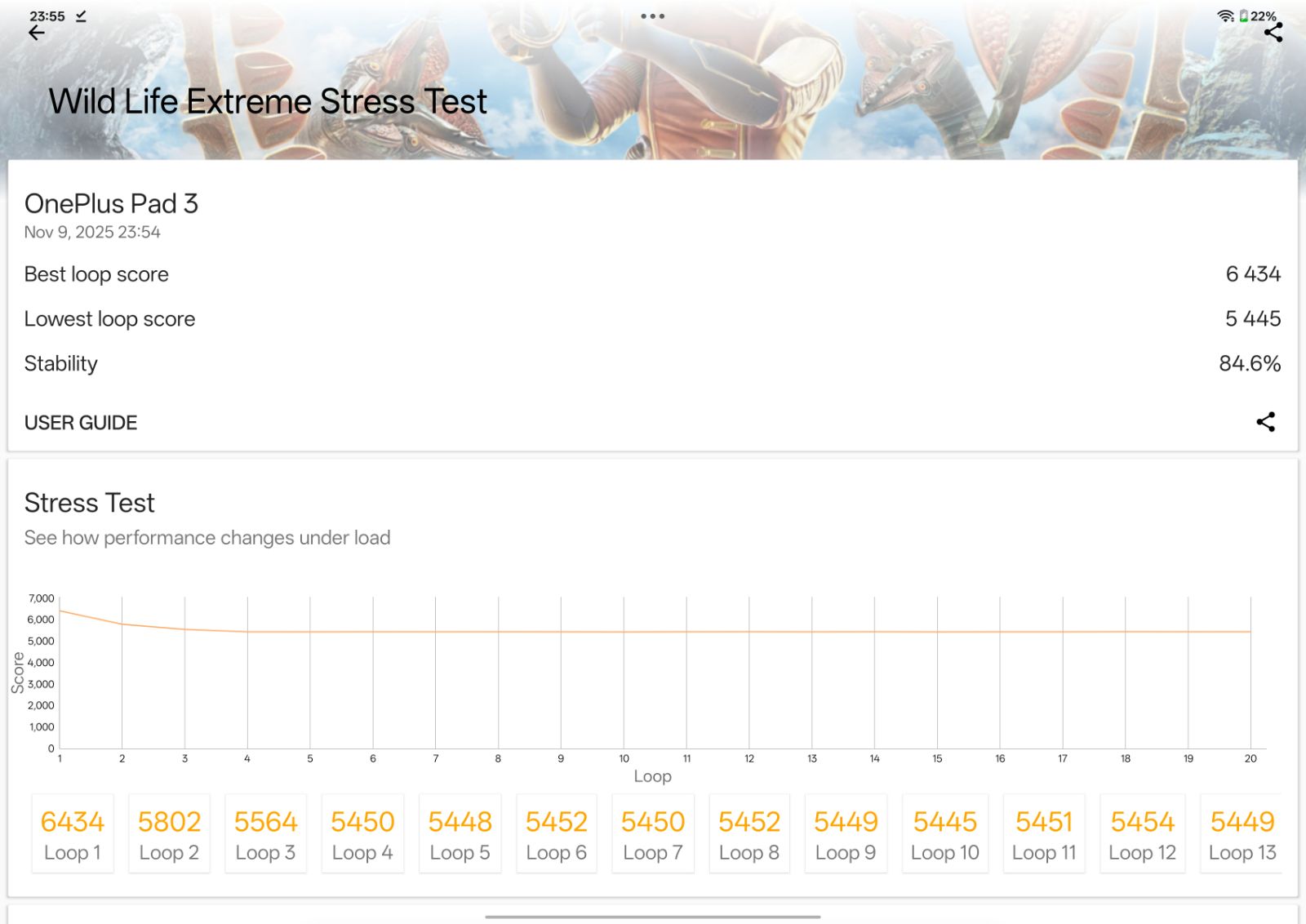
On the other hand, Heat management is impressive too. The large aluminium body helps keep temperatures under control, so even during long gaming sessions, the tablet never feels uncomfortably warm. Even during long gaming in demanding games like Genshin Impact, Call of Duty: Mobile, and Asphalt 9, the tablet stayed cool and consistent, with no frame drops or throttling. It’s genuinely one of the most reliable Android tablets for gamers and heavy multitaskers.
However, it’s the software experience that makes the OnePlus Pad 3 stand out. The machine runs on OxygenOS 15 (based on Android 15), and it delivers an intuitive, desktop-like experience. OnePlus promises three years of major updates and six years of security patches, which adds long-term peace of mind. The standout feature here is Open Canvas, a multitasking setup that lets you use up to three apps simultaneously, rearrange them with a tap, or expand one to full screen without leaving your workflow. It’s fluid, smart, and surprisingly addictive once you get used to it.
Also read: Realme P4 Pro 5G review: Crisp display, AI smarts and all-day stamina under ₹25000
The interface remains close to stock Android, with minimal bloatware and plenty of customisation options. Additionally, features such as NFC tap-to-connect, O+ Connect for iPhones and Macs, and AI tools like the voice recorder's transcription feature and Notes' text rewriting tool make daily use seamless.
That said, Android’s tablet ecosystem still lags behind iPadOS. Some apps like Google Docs don’t transition smoothly between app and web versions, and creative software options remain limited. Despite that, the OnePlus Pad 3 offers one of the best Android tablet experiences yet, powerful, polished, and purpose-built for real work. It’s not trying to replace your laptop, but it might just convince you to use it more than you expected.
OnePlus Pad 3 Review: Battery Life and Charging

Whether it's long workdays or binge sessions, the OnePlus Pad 3 can easily handle it. Its massive 12,140mAh battery delivers a solid 8 to 9 hours of screen time, even under heavy use. And when it’s time to recharge, the included 80W fast charging powers it back to 100% in less than one and a half hours, no waiting, just go.
Final Verdict
The OnePlus Pad 3 offers powerful performance and a longer battery life, which makes it one of the best Android tablets under Rs. 50,000. Its stunning 13.2-inch 3.4K display, sleek metal design, and flagship-level Snapdragon 8 Elite processor make it one of the most capable Android tablets ideal for entertainment, multitasking, and productivity on the go. The long battery life and fast charging further add to its appeal.
However, the Smart Keyboard feels underwhelming, with soft key feedback and weak magnetic attachments that make it unreliable for productivity tasks. While the all-metal design is classy, it attracts smudges easily, and the audio output lacks the crispness expected at this price. Also, despite OxygenOS 15’s fluidity and desktop-style multitasking, Android’s app ecosystem for tablets still trails behind iPadOS in terms of creative and professional software support.
Nevertheless, at Rs. 49,999, the OnePlus Pad 3 offers an excellent balance of power, design and value. It’s ideal for users who want premium performance, top-tier display quality, and dependable battery life without stepping into the Apple ecosystem. Those seeking a more robust creative or typing experience may prefer the iPad Air or Samsung Galaxy Tab S9. Still, for everyone else, the OnePlus Pad 3 is a refined, future-ready tablet that blends work and play better than most in its class.


