E-Paper



Everything you need for a powerful streaming and content creation setup in 2026
Building a streaming or content creation setup in 2026 requires the right balance of PC power, camera quality, audio clarity and lighting.

 Prefer HTon Google


Our Picks
FAQs
Our Picks
| Product | Rating | Price |
|---|---|---|
ASUS T500,13th Gen,Intel Core i5-13420H,Gaming Tower(RTX 3050-6GB/16GB RAM/1TB SSD/Windows 11/M365 Basic (1Year)*/Office Home 2024/with Gaming RGB Keyboard & Mouse(USB)/ Gray/5.9 Kg)T500MV-13420H022WSView Details  | ₹78,990 | |
 | ||
HP Omen 35L Gaming Desktop Intel Core Ultra 5 225F, 8GB NVIDIA GeForce RTX 5060 (16 GB DDR5, 1TB SSD) Win11, M365 Basic(1yr)*MSO 2024, Black Metal, 14.5kg, GT16-0017inView Details | ₹1.50L | |
| ||
CHIST Gaming PC, 9Th Gen Core I5-9400 6 Core 6Threats, 16GB RAM, 256GB NVME SSD 500GB HDD, RTX 3050 6GB GDDR6, Wi-Fi, Windows 11 Pro (White)View Details | ₹68,000 | |
| ||
CyberPowerPC Gamer Xtreme VR Gaming PC, Intel Core i5-14400F 2.5GHz, GeForce RTX 5060 Ti 8GB, 16GB DDR5, 2TB PCIe 4.0 SSD, WiFi Ready & Windows 11 Home (GXiVR8060A34)View Details | ₹1.55L | |
| ||
ALKETRON Icecube T100-Windows 11 Pro Gaming Desktop Pc-i9 Intel Core 14Th Gen with RTX3060(12GB) Dedicated Graphics; 32GB RAM; 1TB SSD(Ready to Use DDR4 CPU Tower Box Piece-Professional Plus Edition)View Details | ₹1.56L | |
| ||

Research-Backed Choices
Every product we recommend is chosen through a combination of Primary Research and Secondary Research.
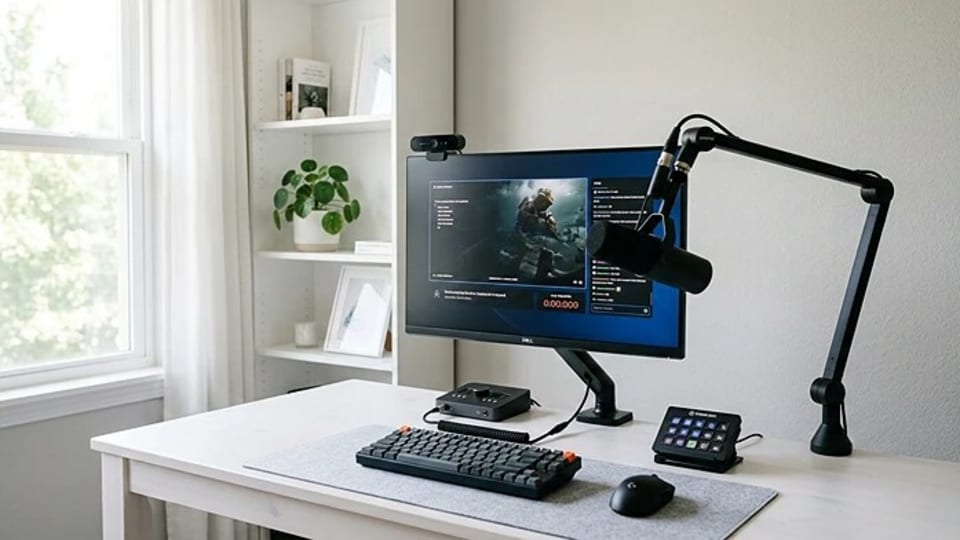

Streaming and content creation have evolved rapidly in the past few years. In 2026, production quality plays an important role, and to increase the quality, you need professional-grade hardware. A simple webcam and a lavalier microphone are no longer enough to stand out.
The problem is that building a gaming, streaming or content creator setup is not easy. With the right combination of camera, microphone, lighting, and PC, you can produce studio-level content from a small workspace. This guide will explain to you which essential components you require for your modern streaming and content creation setup.
Why a proper streaming or content creation setup matters
You need a well-planned setup which does more than just improve visuals. It also helps you create consistency, reduce technical issues and make the whole workflow quick and smooth. With an improved streaming setup, you will get:
- Better audio clarity for professional communication
- Stable video output for streaming platforms
- Faster workflow for editing and publishing
- Improved audience engagement and viewer retention
A high-performance computer is the foundation
The most important part of any streaming or content creation setup is your computer. Everything runs through it, from recording videos to streaming live sessions and editing content later. If your PC is not powerful enough, you may experience lag, dropped frames or even crashes during important streams.
A modern streaming setup usually requires a multi-core processor, at least 16GB of RAM and fast SSD storage. These specifications help your system handle multiple tasks at the same time. A dedicated graphics card can also help with video processing and smooth streaming performance. When your system is powerful and stable, you can focus more on your content instead of worrying about technical issues.
Check out high performance PC for streaming
Choosing the right camera for your content
The camera you use will directly affect how professional your content looks. While basic webcams are still widely used, many creators now prefer higher-quality options to improve image clarity.
Modern streaming setups often include Full HD or even 4K webcams. Some creators also use mirrorless cameras connected through capture devices for better image quality and natural depth. Regardless of the camera you choose, proper placement is important. Keeping the camera at eye level and maintaining good framing can make your video look far more professional.
Check out the camera for gaming
A good microphone improves your content instantly
Audio quality is something many new creators underestimate, but it can make a huge difference. Viewers can tolerate average video quality, but they rarely stay if the audio sounds unclear or distorted.
A good microphone helps your voice sound clear and professional. Many creators start with a USB microphone because it is simple to use and does not require additional equipment. As creators upgrade their setup, some move to XLR microphones, which offer better sound control and quality. Using a pop filter or boom arm can also help reduce unwanted noise and improve audio consistency during streaming or recording.
Check out streaming microphones
Lighting can completely transform video quality
Lighting is one of the most important parts of any streaming setup, yet it is often ignored by beginners. Even a high-end camera can produce poor results if the room lighting is uneven or too dim.
A proper lighting setup helps your camera capture clear details and natural colours. Many creators use ring lights or softbox lights to create balanced illumination. A key light placed in front of you usually provides the main brightness, while additional lighting can reduce shadows and improve background depth. Good lighting instantly makes your content look sharper and more polished.
Check out these streaming lights on Amazon
Once you have the right foundation in place, producing high-quality content becomes much easier. Over time, you can continue upgrading individual parts of your setup as your channel grows. A well-planned setup not only improves the quality of your content but also helps you stay consistent and professional in the long run.
Similar articles for you
Buying a Sony camera in India? These are the ones that make the most sense
Top headsets I would recommend right now for gaming, music and calls
Disclaimer: At Hindustan Times, we help you stay up-to-date with the latest trends and products. Hindustan Times has an affiliate partnership, so we may get a part of the revenue when you make a purchase. We shall not be liable for any claim under applicable laws, including but not limited to the Consumer Protection Act, 2019, with respect to the products. The products listed in this article are in no particular order of priority.