
Sign in

Google Pay gets an AI upgrade in India: New 'Ask Google Pay' feature helps you track your spending

Google Pay's new Ask Google Pay feature supports 10 Indian languages.

Published on: Jul 30, 2026, 17:27:19 IST
Share
Share via
  • facebook
  • twitter
  • linkedin
  • whatsapp
Copy link
  • copy link

UPI has made making payments, both small and large, easier and faster in India. But it has also made it a tad bit difficult to keep a track of finances. The smaller transactions that a lot of Indians make throughout a day usually stack up by the end of the month, which in turn make it difficult to decode our spendings and plan our saving better. To help Google Pay users manage their finances better, Google has launched a new feature in India called 'Google Pay Ask'.
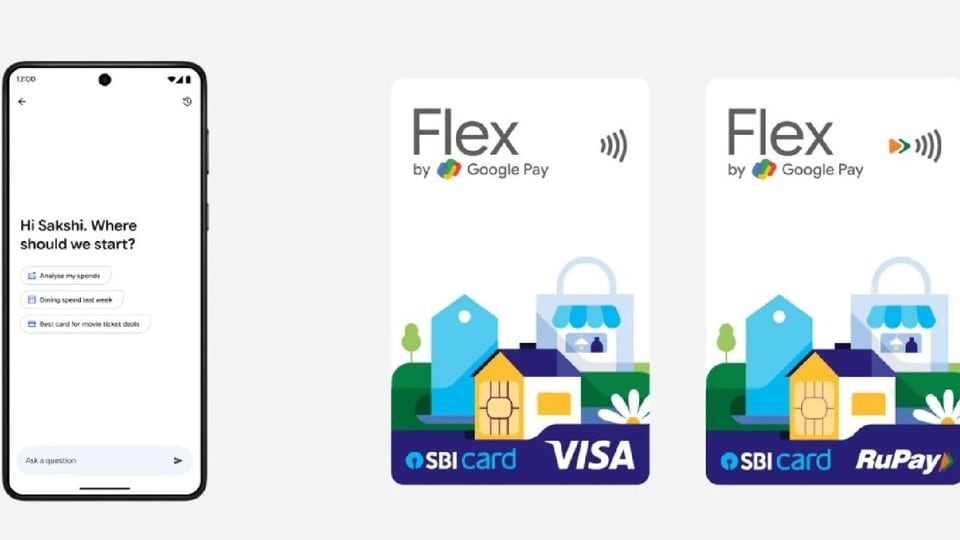
Google Pay gets Google Pay Ask in India. (Google)
Shweta Ganjoo

Shweta Ganjoo is a Chief Content Producer at HT Tech. She has over 10 years of experience covering technology, during which time she has focused on consumer tech devices, AI, social media, gadgets, and tech policy, delivering authoritative and reader-focused insights across India’s fast-evolving digital ecosystem.

She began her career in the early 2010s, building a strong foundation in digital-first reporting as India’s tech landscape rapidly expanded. Over the years, she has worked with leading media organizations including India Today Tech, Indian Express Group, and Techlusive, where she played a key role in scaling editorial content and audience engagement. At HT Tech, she drives product recommendation coverage, combining newsroom leadership with hands-on reporting experience.

Her expertise spans smartphones, wearables, smart home devices, AI, and social media ecosystems, along with regulatory developments shaping the tech industry. Shweta is known for her analytical approach to product reviews and news coverage, grounded in hands-on testing and real-world usability. She has conducted industry interviews, tracked emerging tech trends, and produced research-backed stories using verified sources and expert inputs. She holds a masters in Mass Communication, which complements her professional experience in digital journalism and content strategy, and aligns with her academic background in technology. Shweta follows a reader-first editorial philosophy, prioritising accuracy, transparency, and fact-checked reporting to deliver reliable, insightful, and practical insights.

Read moreRead less

This new feature uses the company's Gemini models to help users analyse their spendings patterns and get information that would in turn help them to manage their money better. Google says that users can chat with its newly launched feature to understand their spending patterns, get savings tips, explore tailored offers such as finding the right credit card for their travel expenses or luxury spends, and learn about various financial concepts like SIPs and credit scores using both text input or voice queries. They can also ask it to learn more about compounding interest on various assets differences between various tax regimes.

Once a user has shared their query, Ask Google Pay will use their transaction history and CIBIL report data to provide suggestions that are tailored to them. That said, Google notes that this is an opt-in feature and that users will have to turn on the 'Personalization within Google Pay' feature to use the new "Ask Google Pay' feature. Both these features are turned off by default.

How to enable Personalisation feature in the Google Pay app?

Here's a step-by-step guide for the same:

Step 1: Update the Google Pay app and open it.

Step 2: At the bottom right corner, click the 'You' button and then go to 'Settings'.

Step 3: In the Settings go to 'Privacy & Security' and then tap the' Data and personalisation' option.

Step 4: Lastly, turn on the 'Personalisation within Google Pay' toggle button.

How to access 'Ask Google Pay' feature?

Here's a step-by-step guide for the same:

Step 1: Enable the Personalisaton experience in the Google Pay app.

Step 2: At the bottom of the home screen, tap the 'Money' option.

Step 3: To start a chat with Ask Google Pay, under 'Ask About your finances', tap the 'Ask a question' button.

Google expands Flex by Google Pay

Lastly, Google has also announced that it is expanding its Flex by Google Pay feature. As a part of the update, it is bringing a new credit card experience to the Google Pay users in partnership with SBI. Google says with the new Google Pay Flex SBI Card, users can use the card on both RuPay and VISA payment networks, earn Stars that are instantly redeemable with every Flex transaction wherein 1 Star equals Re 1, and convert their latest outstanding credit card bill into convenient EMIs.

Additionally, the company said that all Flex card users will be eligible to get the Google AI Plus plan at a 50 percent discount for one year, while earning additional stars for their everyday purchases. They will also be able to get a discount across the entire range of Google Pixel smartphones.

For the unversed, Google launched Flex by Google Pay in December last year. It is a UPI-powered, digital, co-branded credit card. It offers instant rewards points, UPI-like credit card payments and flexible EMI plans to the users.

  • Shweta Ganjoo
    ABOUT THE AUTHOR
    Shweta Ganjoo

    Shweta Ganjoo is a Chief Content Producer at HT Tech. She has over 10 years of experience covering technology, during which time she has focused on consumer tech devices, AI, social media, gadgets, and tech policy, delivering authoritative and reader-focused insights across India’s fast-evolving digital ecosystem. She began her career in the early 2010s, building a strong foundation in digital-first reporting as India’s tech landscape rapidly expanded. Over the years, she has worked with leading media organizations including India Today Tech, Indian Express Group, and Techlusive, where she played a key role in scaling editorial content and audience engagement. At HT Tech, she drives product recommendation coverage, combining newsroom leadership with hands-on reporting experience. Her expertise spans smartphones, wearables, smart home devices, AI, and social media ecosystems, along with regulatory developments shaping the tech industry. Shweta is known for her analytical approach to product reviews and news coverage, grounded in hands-on testing and real-world usability. She has conducted industry interviews, tracked emerging tech trends, and produced research-backed stories using verified sources and expert inputs. She holds a masters in Mass Communication, which complements her professional experience in digital journalism and content strategy, and aligns with her academic background in technology. Shweta follows a reader-first editorial philosophy, prioritising accuracy, transparency, and fact-checked reporting to deliver reliable, insightful, and practical insights.Read More

Stay updated with the latest Technology News, gadget launches, app updates, artificial intelligence and digital trends. Find reviews, comparisons and useful insights from the world of tech.