
 E-Paper



X (formerly Twitter) rolls out audio and video calls. How to activate and use
While there is no formal announcement, users, after logging into the platform, are getting a notification stating that ‘Audio and video calls are here!’

 Prefer HTon Google


Elon Musk-owned X (previously Twitter) has finally started rolling out audio and video calls. While the company is yet to make a formal announcement, users, after logging into the platform, are getting a notification stating that ‘Audio and video calls are here!’ reported The Verge.

However, Linda Yaccarino, the social network's CEO, was more direct, as she took to X and posted a picture that showed her in a video conversation. “Video calls (fire emoji),’ Yaccarino captioned the image.
X, meanwhile, teased the feature with a cryptic post that read: 'ready for it…?"
How to enable audio and video calls?
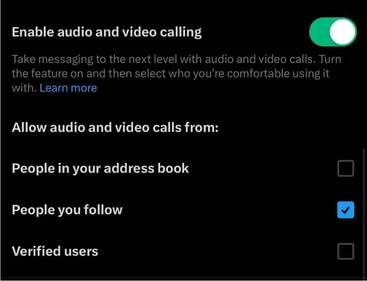
A screenshot shared by the website shows that the option to enable audio and video calling lies within the microblogging website’s settings, and is in the form of a toggle. Additionally, people can choose who can make calls to them: those in their address book, those who they follow, verified handles, or all three.
How to make audio and video calls?
For this, first update the app, and then go to: Settings> Privacy & Safety> Direct Messages> Enable Audio & Video Calling. Finally, click to send a direct message (DM) to someone; there, you will see the phone icon in the upper-right corner.
Elon Musk confirmed the feature
The development comes nearly two months after Musk, the world's richest person, confirmed that audio and video calling will be launched for X.


