
 E-Paper



AIIMS MBBS admit card 2018 released, here’s how to download yours
AIIMS MBBS admit card 2018:Candidates can download their admit cards from the official website of AIIMS. No emails will be sent out to them.


Candidates who have applied for the All India Institute of Medical Science’s (AIIMS) MBBS entrance examination can access their admit cards at aiimsexams.org or mbbs.aiimsexams.org. The date for uploading of MBBS entrance exam 2018 admit card on AIIMS website is May 10.
The exams are scheduled for May 26 and May 27, 2018 (two shifts per day).
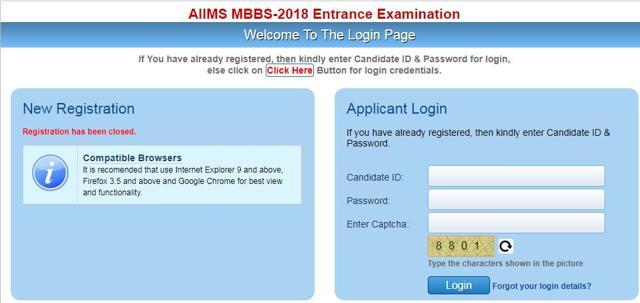
Candidates can download their admit cards from the official website of AIIMS. No emails will be sent out to them for this purpose. Registrations for the exam had closed on March 5, 2018. Candidates can get admitted to MBBS courses in AIIMS, New Delhi and eight other AIIMS in the country, namely Patna, Bhopal, Jodhpur, Bhubaneswar, Rishikesh, Raipur, Guntur (AP) and Nagpur (Maharashtra) on the basis of their performance in the AIIMS MBBS entrance examination.
Candidates will appear for the online mode examination in two shifts (9 am to 12.30 pm and 3 pm to 6.30 pm).
The venue, time and shift of the examination will be given in the admit card.
The admit card will not be sent by post. Candidate must possess a valid admit card to appear in the exam. Follow the instructions given in the admit card properly.
AIIMS MBBS admit card 2018: How to download
Go to the AIIMS official website, mbbs.aiimsexams.org, or click here.
Once the new window opens, go to the ‘applicant login’ box, enter your ID, password to login.
•Once the login window opens, click on ‘download admit card’ to access your card.


