
 E-Paper



UPSC Engineering Services Exam Notification 2020 released, apply now at upsc.gov.in
UPSC has released the notification for Indian Engineering Services 2020 exam. The online application process has also begun and the last date to apply is October 15, 2020.


UPSC IES 2020: Union Public Service Commission (UPSC) has issued the official notification for the Indian Economic Services (IES) and Indian Statistical Service (ISS) Exam 2020. The application will be accepted till October 15, 2019 till 6 pm.
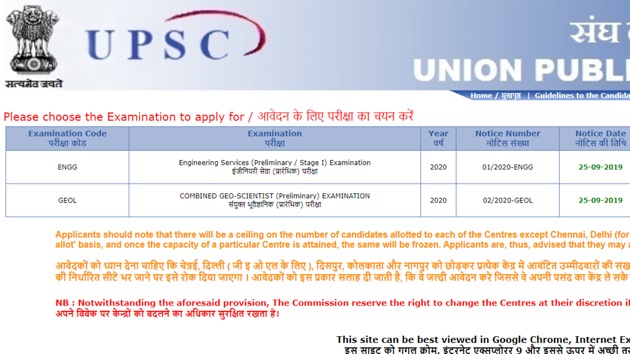
UPSC has also released the official notification for combined geo-scientist exam 2020. The last date to apply for the same is October 15, 2019. The exam will be conducted on January 19, 2020.
Candidates can visit the official website of UPSC to apply online for UPSC exam 2020 at www.upsconline.nic.in. UPSC will conduct the IES exam on January 5, 2020.
DETAILS OF VACANCY:
The number of vacancies to be filled on the results of the examination is expected to be approximately 495 including 21 vacancies for the Persons with Benchmark Disabilities (PwBD) (03 vacancies for Low Vision, 11 vacancies for Locomotor Disability including Leprosy cured, Dwarfism, Acid Attack victims and Muscular Dystrophy & 07 vacancies for Hard of Hearing). The number of vacancies is liable to alteration.
UPSC IES Exam 2019: How to apply
Visit the official website of UPSC at upsc.gov.in
On the right panel, click on the ‘Apply online’ tab
Click on the link that reads, ‘Online Application for Various Examinations’
Click here to download UPSC IES ISS Notification 2020
Click on ‘ONLINE APPLICATION FOR VARIOUS EXAMINATIONS OF UPSC’
Another page with active application links will open
Click on the link reads ‘Click here for Part-1 registration’ link beside the name of the exam IES exam 2020
A declaration form will open. Read the instruction given and click on ‘YES’ after reading it.
A form will appear on the screen
Fill in the required details including- name, father’s name, mother’s name, gender, community, date of birth, place of birth, Aadhar number, mobile number, email ID etc
Chose a password that you can remember or it is better to note it down. You will need the ID password to login in future to download your admit card etc.
Click ‘Save and Next’
In the next page, you will get another form to select your subject, fill your marks obtained in graduation, name of your college etc. You should carefully the subject for which you will take the exam for.
Click ‘Save and next’
In the next page, you will have to upload your photograph and a snap of your signature.
You will have to resize the photos into the required size which is around 5 -25 KB.
You will get the resized pictures. Download and upload it on the UPSC portal.
After uploading the photos/sign, click submit.
You will get an Acknowledgement number on your registered mobile number and email ID. Save it
Also download the preview of your form and take its print out for future reference
Download UPSC IES notification 2020 here.


