
 E-Paper



UPSC IES, ISS Exam 2019 notification out today. Download PDF, check how to apply
UPSC IES/ISS Notification 2019 released: Application ends on April 16. Apply at upsc.gov.in. Check step by step guide to register online.


UPSC IES ISS 2019: Union Public Service Commission (UPSC) has issued the official notification for the Indian Economic Services (IES) and Indian Statistical Service (ISS) Exam 2019. The application will be accepted between March 20 and April 16.

Important Dates:
Commencement of application/ notification releasing on --- March 20
Last date to apply----- April 16
Exam commencing on---- - June 28 for 3 days.
UPSC IES/ISS 2019: Number of vacancies
There were 55 posts in 1) Indian Economic Service -32 posts
Indian Statistical Service - 33 posts.
UPSC IES/ISS 2019: Age limit
A candidate must have attained the age of 21 years and must not have attained the age of 30 years on 1st August, 2019 i.e he/she must have been born not earlier than 2nd August, 1989 and not later than 1st August, 1998.
UPSC IES/ISS 2019: EWS Reservation
EWS Candidates can submit their Income and Asset Certificate (certificate of eligibility) at the time of submission of online Detailed Application Form (DAF). The Income and Asset Certificate must be dated earlier than 1st August, 2019. Since reservation for EWS category candidates has been notified recently, therefore this extension for submission of certificate for EWS category candidates is a one time relaxation applicable for Indian Economic Service/ Indian Statistical Service Examination, 2019 only.
UPSC IES/ISS 2019: Fees
Candidates (excepting Female/SC/ST/Persons with Benchmark Disability Candidates who are exempted from payment of fee) are required to pay fee of Rs. 200/-
UPSC IES/ISS 2019 Scheme of exam:
The Indian Economic Service/Indian Statistical Service Examination is conducted in two stages: 1) The written exam carrying a maximum of 1000 marks 2) The Viva voce (oral exam) carrying a maximum of 200 marks.
There is negative marking for wrong answers by a candidate in the objective type question papers.
UPSC IES/ISS 2019: Exam Paper
The question papers in all subjects in Indian Economic Service Examination and in Indian Statistical Service Examination will be of conventional (essay) type except in Statistics Paper I and Statistics Paper II which are of objective type. All question papers must be answered in English.
A combined competitive examination for recruitment to Junior Time Scale of the Services will be held by UPSC commencing from May 12, 2017 at various centres across the country (see details in the notification below).
UPSC IES/ISS Exam 2019: How to apply
Visit the official website of UPSC at upsc.gov.in
On the right panel, click on the ‘Apply online’ tab
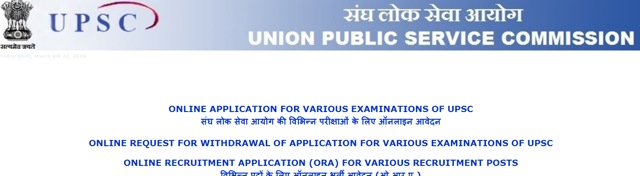
Click on the link that reads, ‘Online Application for Various Examinations’
Click here to download UPSC IES ISS Notification 2019
Click on ‘ONLINE APPLICATION FOR VARIOUS EXAMINATIONS OF UPSC’
Another page with active application links will open
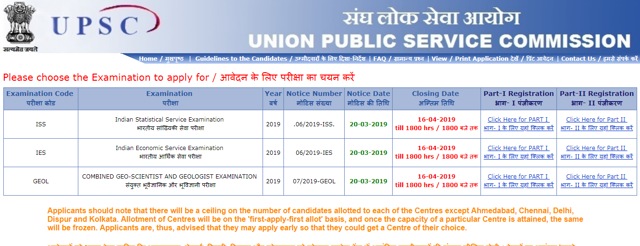
Click on the ‘Click here for Part-1 registration’ link beside the name of the exam IES/ISS/ Geo scientist exam
A declaration form will open. Read the instruction given and click on ‘YES’ after reading it.
A form will appear on the screen
Fill in the required details including- name, father’s name, mother’s name, gender, community, date of birth, place of birth, Aadhar number, mobile number, email ID etc
Chose a password that you can remember or it is better to note it down. You will need the ID password to login in future to download your admit card etc.
Click ‘Save and Next’
In the next page, you will get another form to select your subject, fill your marks obtained in graduation, name of your college etc. You should carefully the subject for which you will take the exam for.
Click ‘Save and next’
In the next page, you will have to upload your photograph and a snap of your signature.
You will have to resize the photos into the required size which is around 5 -25 KB.
You will get the resized pictures. Download and upload it on the UPSC portal.
After uploading the photos/sign, click submit.
You will get an Acknowledgement number on your registered mobile number and email ID. Save it
Also download the preview of your form and take its print out for future reference


