E-Paper



Choosing an ink tank printer can be tricky, so here are five options with different strengths and features
Looking for a printer for everyday use? This guide compares ink tank models based on print quality, speed, connectivity, ink yield and useful home features.

 Prefer HTon Google


Our Picks
FAQs
Our Picks
| Product | Rating | Price |
|---|---|---|
Canon PIXMA MegaTank G3000 All in One WiFi Ink Tank Colour Printer with Scanner for Home, Upto 6000 Black and 7000 Colour Prints with 2 Additional Black Ink BottlesView Details  | ₹14,399 | |
 | ||
HP Smart Tank 670 All-in-One Auto Duplex WiFi Integrated Ink Tank Colour Wired Color Home Inkjet PriView Details | ||
| ||
Epson EcoTank L3352 (New Launch) WiFi All-in-One InkTank A4 Colour Printer, Scanner, Copier for Home & Office, 5760x1440dpi Resolution, with Wireless and Mobile Printing FeatureView Details | ||
| ||
HP Smart Tank 589 All-in-One WiFi Colour Printer |Up to 4000 Black & 6000 Colour Prints I Print,Scan & Copy for Home/OfficeView Details | ₹13,999 | |
| ||
Brother Ink Tank DCP-T730DW (New Launch) WIFI Auto Duplex Color Multifunction Printer (Print Scan Copy), ADF, Print Upto 15K Pages Black & 5K in Color Each for(CMY), Extra Black Ink, Free InstallationView Details | ||
| ||

Research-Backed Choices
Every product we recommend is chosen through a combination of Primary Research and Secondary Research.
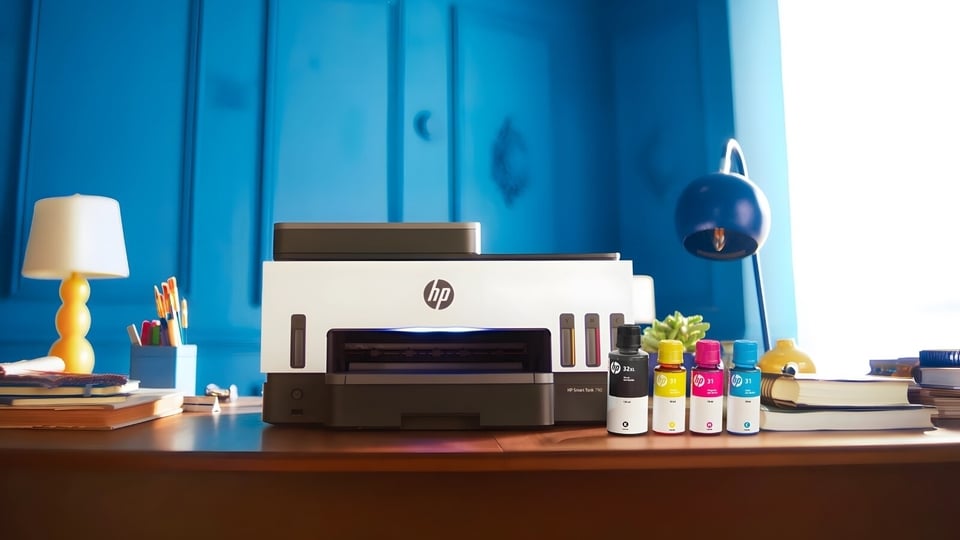
Students and home users rarely need a printer built for a busy corporate office, but buying the cheapest model can also create problems later. Frequent assignments, forms, notes, projects and occasional photos make running costs, wireless printing and ease of refilling important factors. Ink tank printers are designed around exactly that kind of usage, offering refillable bottles instead of conventional cartridges. The five models in this list come from Canon, HP, Epson and Brother, with differences in print speed, connectivity, paper handling and two-sided printing. Some are better suited to occasional home printing, while others bring features that can make sense for heavier workloads. The idea is to look beyond the upfront price and understand what each printer actually offers for everyday use.
1. Canon PIXMA MegaTank G3000 All in One WiFi Ink Tank Colour Printer with Scanner for Home, Upto 6000 Black and 7000 Colour Prints with 2 Additional Black Ink Bottles
The Canon PIXMA G3000 is an older but still relevant refillable ink tank all-in-one designed for high-volume home printing. It handles printing, scanning and copying, with Wi-Fi and USB connectivity for computers and mobile devices. Its 4,800 x 1,200 dpi maximum print resolution and high-yield GI-790 bottles make it suitable for assignments, documents and occasional photo printing. Canon rates it at 8.8 ipm for black and 5.0 ipm for colour.
Specifications
Reasons to buy

Refillable tanks keep recurring ink costs manageable
Wi-Fi makes printing from compatible devices convenient
High page yields suit students with frequent assignments and notes
Reason to avoid

No automatic two-sided printing
Print speeds are modest for longer documents
Wi-Fi operates on the 2.4GHz band
What are buyers saying on Amazon?
Customers generally praise the G3000 for economical printing, good print quality and easy operation, particularly from phones. However, installation and wireless connectivity receive mixed feedback. Buyers also have divided opinions about reliability and speed, with some reporting smooth performance while others encounter printing problems.
Why should you choose this product?
The G3000 is geared towards buyers who want a straightforward refillable printer without paying for more advanced office features. Its high ink yields and mobile printing support make it a practical fit for regular home and student printing.
2. HP Smart Tank 670 All-in-One Auto Duplex WiFi Integrated Ink Tank Colour Wired Color Home Inkjet Pri

Our Principles
Full Transparency
Every product review clearly lists the Pros and Cons, giving you a balanced view.
Brand Confidence
We focus on products from brands with a proven reputation and long-standing market trust.
The HP Smart Tank 670 is the more feature-rich HP option here, combining print, scan and copy functions with dual-band Wi-Fi and automatic two-sided printing. It can print up to 12 ppm in black and 7 ppm in colour, while its 150-sheet input tray is useful when printing several assignments or documents at once. A flatbed scanner and mobile printing support round out the package.
Specifications
Reasons to buy
Automatic duplex printing saves paper and manual effort
Dual-band Wi-Fi gives more flexible wireless connectivity
150-sheet input tray is useful for regular home printing
Reason to avoid
Higher upfront cost than simpler ink tank models
Recommended monthly volume is only 400 to 800 pages
Flatbed scanning means there is no automatic document feeder
What are buyers saying on Amazon?
Customers generally like the printer for home and office use and praise its installation in many cases. Feedback on print speed and quality is mixed, with some reporting good mobile printing while others mention slow output or printhead problems. Wireless connectivity also receives several negative comments.
Why should you choose this product?
Automatic duplex printing and dual-band Wi-Fi give the Smart Tank 670 a more complete feature set for regular home printing. It suits students and families who print multi-page documents and want less manual paper handling.
3. Epson EcoTank L3352 (New Launch) WiFi All-in-One InkTank A4 Colour Printer, Scanner, Copier for Home & Office, 5760x1440dpi Resolution, with Wireless and Mobile Printing Feature
The Epson EcoTank L3352 is an Amazon-exclusive all-in-one aimed at home users who want low-cost colour printing and wireless access. It supports print, scan and copy functions, along with Wi-Fi and Wi-Fi Direct. Epson quotes up to 11 ipm black and 6 ipm colour print speeds, while the 5,760 x 1,440 dpi resolution and borderless 4R photo support make it versatile for both documents and small photo prints.
Specifications
Reasons to buy
High-resolution printing suits documents and colour projects
Wi-Fi Direct allows printing without a router
Borderless printing up to 4R is useful for photos and school projects
Reason to avoid
No automatic two-sided printing
Colour printing is slower than the HP Smart Tank 670
Designed primarily around home use rather than high-volume office workloads
What are buyers saying on Amazon?
Customers generally find the L3352 useful for home and office printing, with easy setup and wireless connectivity receiving positive mentions. However, some buyers report receiving used or damaged units, along with scanner problems, driver-related difficulties and concerns about build quality.
Why should you choose this product?
The L3352 combines high-resolution output, wireless printing and borderless 4R support in a compact home-oriented design. It is particularly suited to students who print both coursework and occasional colour projects or photographs.
4. HP Smart Tank 589 All-in-One WiFi Colour Printer |Up to 4000 Black & 6000 Colour Prints I Print,Scan & Copy for Home/Office
It is a basic print, scan and copy model with Wi-Fi, Wi-Fi Direct and USB connectivity. HP rates it at up to 12 ppm in black and 5 ppm in colour. Manual duplex support is available, while the 100-sheet input tray keeps it suited to lighter home workloads.
Specifications
Reasons to buy
Refillable ink system suits regular home printing
Wi-Fi and Wi-Fi Direct support wireless printing
Compact feature set is sufficient for basic student workloads
Reason to avoid
No automatic duplex printing
Colour print speed is limited to Up to 5 ppm
What are buyers saying on Amazon?
Customers find the printer suitable for home and office use and generally praise its print quality and Wi-Fi connectivity. Setup feedback is mixed, while several buyers report slow printing and paper jams. Opinions on value are also divided, with some considering it affordable and others finding the cost difficult to justify.
Why should you choose this product?
The Smart Tank 589 keeps the essentials covered without adding complex office features. It fits students and home users who need print, scan and copy functions with wireless access but do not require automatic duplexing or high-volume paper handling.
The Brother DCP-T730DW is the most office-oriented printer in this group, adding automatic duplex printing and a 20-sheet automatic document feeder to the usual print, scan and copy functions. It supports dual-band Wi-Fi, Wi-Fi Direct and USB 2.0, while its rated speeds reach up to 16 ipm in black and 15.5 ipm in colour. The included ink set is rated for high page yields.
Specifications
Reasons to buy
Automatic duplex printing is useful for longer documents
20-sheet ADF simplifies multi-page scanning and copying
Faster rated print speeds suit heavier home workloads
Reason to avoid
Higher upfront price than basic home-focused models
ADF is limited to 20 sheets
Its additional office features may be unnecessary for occasional printing
What are buyers saying on Amazon?
Customers praise the DCP-T730DW for sharp, clear output, vibrant colours and home and office use. Automatic two-sided printing and the 20-page scanning capability are appreciated. However, installation feedback is mixed, while some buyers report connectivity problems and differing opinions on print speed.
Why should you choose this product?
The DCP-T730DW adds features that are genuinely useful when printing and scanning several pages at once. Its automatic duplexing, ADF and faster rated speeds make it better suited to students or home users with heavier document workloads.
Top 3 features of ink tank printers
Printer | Print speed | Connectivity | Key feature |
|---|---|---|---|
Canon PIXMA G3000 | 8.8 / 5.0 ipm | Wi-Fi, USB | High-yield ink |
HP Smart Tank 670 | Up to 12 / 7 ppm | Dual-band Wi-Fi, USB | Automatic duplex |
Epson EcoTank L3352 | Up to 11 / 6 ipm | Wi-Fi, Wi-Fi Direct | Borderless 4R printing |
HP Smart Tank 589 | Up to 12 / 5 ppm | Wi-Fi, Wi-Fi Direct, USB | Refillable ink system |
Brother DCP-T730DW | Up to 16 / 15.5 ipm | Dual-band Wi-Fi, USB | ADF and auto duplex |
Factors to consider when buying an ink tank printer
- Ink yield: Check the stated black and colour page yields if you expect to print assignments, notes and projects regularly.
- Print speed: Higher ISO speeds matter when you frequently print multi-page documents rather than just a few sheets at a time.
- Duplex printing: Automatic two-sided printing can save paper and reduce manual work when printing long assignments or study material.
- Connectivity: Wi-Fi and Wi-Fi Direct make it easier to print from laptops and phones without keeping the printer physically connected to one computer.
- Scanning and copying: Students and home offices can benefit from an all-in-one model, especially when scanning forms, notes or multi-page documents.
Similar articles for you:
Amazon Great Indian Festival 2026: Early deals on TVs live now! Get up to 65% off
A smartwatch should fit your routine, not interrupt it. These five models go the extra mile
Disclaimer: At Hindustan Times, we help you stay up-to-date with the latest trends and products. Hindustan Times has an affiliate partnership, so we may get a part of the revenue when you make a purchase. We shall not be liable for any claim under applicable laws, including but not limited to the Consumer Protection Act, 2019, with respect to the products. The products listed in this article are in no particular order of priority.