
 E-Paper



Gigabyte FO32U2P monitor long-term review: Class-leading panel performance and excellent durability - HT Verified
Exceptional colour accuracy and motion response set this monitor apart.
Updated on: Oct 20, 2026, 16:53:18 IST

 Prefer HTon Google
Share via


Copy link

| Spec | Value |
|---|---|
| Panel | 31.5" QD-OLED |
| Resolution | 3840 × 2160 |
| Refresh | 240 Hz |
| Response | 0.03 ms GtG |
| Video In | DP 2.1 · HDMI 2.1 |
| MSRP | ₹87,000 |
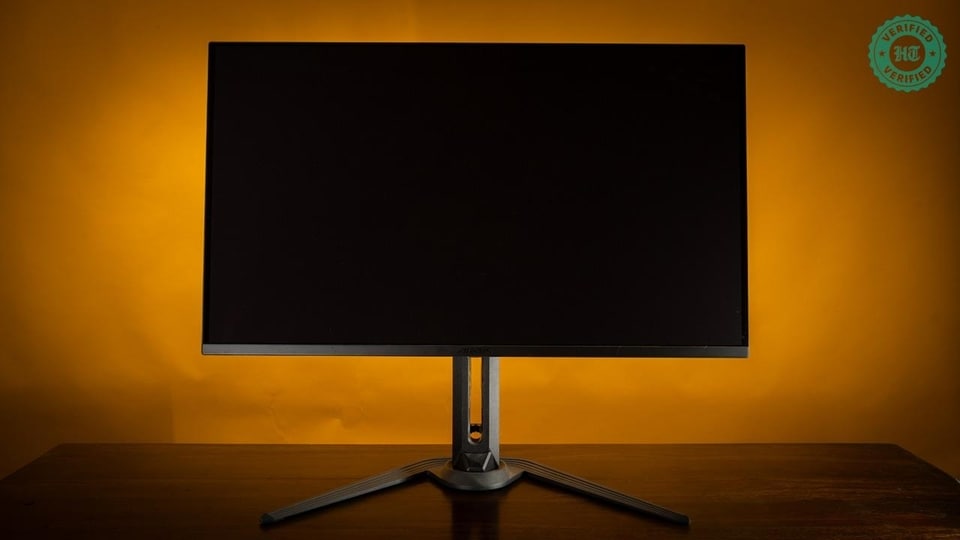
The Gigabyte FO32U2P is a 32-inch, 4K 240 Hz gaming monitor with a third-generation QD-OLED panel, and is one of only a handful of monitors to support the DisplayPort 2.1 spec (DP2.1 UHBR20).
Because this is a third-generation panel, one should expect sharper text and excellent SDR performance with limited HDR support. A stand-out feature of this monitor is its integrated KVM switch and USB hub, not to mention the ability to daisy-chain multiple displays via DisplayPort.
As we shall soon see, some of the monitor's features are in surplus, but the quality of its panel and pixel response for gaming set a very high bar. Since this is also a long-term test, we'll be taking a closer look at burn-in and its effects after nearly two years of use.
Display specifications: Premium panel with 3rd-gen OLED tech
The monitor has a peak SDR brightness (for non-HDR content) of 250 nits. On an LED display this is just sufficient for indoor use in low to moderate lighting. However, since this is an OLED monitor, the near-infinite contrast ratio means that 250 nits can feel too bright.
The FO32U2P can hit 1,000 nits of peak brightness for HDR content, but only over 3% of the display and only when you are in a specific HDR mode. Regular HDR content can only hit a peak brightness of 400 nits over a tiny portion of the display, which is low for HDR.
| Spec | Value |
|---|---|
| Panel Size | 31.5" |
| Panel Type | OLED |
| Resolution | 3840 × 2160 (UHD) |
| Display Viewing Area (H × V) | 699.48 × 394.73 mm |
| Pixel Pitch | 0.181 (H) × 0.181 (V) mm |
| Display Surface | Anti-Reflection |
| Display Colours | 10-bit (1.07B) |
| Colour Saturation | 99% DCI-P3 |
| Brightness | 250 cd/m² (Typ, SDR APL 100%) 1000 nits (Typ, HDR APL 3%) |
| Contrast Ratio (Typ.) | 1.5M:1 |
| Viewing Angle | 178° (H) / 178° (V) |
| Refresh Rate (Max) | 240 Hz |
| Response Time | 0.03 ms GtG |
| HDR Support | VESA DisplayHDR True Black 400 |
| VESA Certified ClearMR | ClearMR 13000 |
| Flicker-free | Yes |
| Factory Calibration | Yes, ΔE < 2 |
Connectivity: KVM switch with USB-PD support
USB Type-C support with 65 W Power Delivery means that you only need one cable to connect and power a laptop, tablet, or compatible phone with the display. Note that 65 W is not sufficient to power a gaming laptop. The bundled cable is rated for both USB PD and DP Alt mode for power, video, and data transfer.
All HDMI and DP ports support 4K 240 Hz output, but only the DP2.1-rated ports can handle uncompressed 4K 240 Hz output. Note that only select GPUs can deliver uncompressed 4K 240 Hz video, and even then I saw no difference in image quality between compressed and uncompressed streams.
One of the DP ports can be used to connect a second monitor via the FO32U2P. Up to four compatible monitors can be daisy-chained in this fashion.
HDMI CEC is supported, which can be useful when connected to, say, a game console.
A note on the KVM switch
The monitor includes a KVM switch that can swap between a single DP/HDMI-connected device paired with a USB-B upstream connection, and another device connected exclusively via USB-C. The two USB ports that are part of the switch operate at 5 Gbps and can be used to share storage media (HDDs, SSDs, card readers) or peripherals (keyboard/mouse) between devices. The switch works as advertised, and one press of the KVM button is all it takes to switch to another device.
Ports & I/O: DisplayPort 2.1 support stands out
| Spec | Value |
|---|---|
| HDMI | 2 × HDMI 2.1 |
| DisplayPort | 1 × DisplayPort 2.1 (UHBR 20) in 1 × DisplayPort 1.4 (HBR3) out |
| Mini DisplayPort | 1 × mini DP 2.1 (UHBR 20) |
| USB Type-C | 1 × USB Type-C (Alternate Mode, Upstream port, Power Delivery up to 65 W) |
| USB | 2 × USB 3.2 Downstream 1 × USB 3.2 Upstream (5 Gbps) |
| Earphone Jack | Yes |
| Microphone Jack | Yes |
| Speakers | 5 W × 2 |
Gaming features: Useful aids but nothing new
The following additional features are available:
- Tactical Switch: A programmable button that can trigger specific modes per a user's preference. For example, pressing the switch can toggle an on-screen crosshair or a resolution switcher.
- Crosshair, Timer: These features overlay a crosshair or timer on the display as an aid when gaming.
- Night Vision: Accentuates detail and brightens shadows to improve visibility in low-light scenes when gaming.
- PiP/PbP: A picture-in-picture mode that allows you to preview a secondary display input while using the primary input.
Power: Higher than similarly sized LCDs
The power draw of 78W on average, and closer to 100W under full-bright conditions, is higher than that of a typical LCD. This power draw is on par with that of other OLED panels, however, as OLED tech in general tends to draw more power at these sizes.
| Spec | Value |
|---|---|
| Power Type | Power Adapter |
| Voltage | AC 100–240 V ~ 50/60 Hz |
| Power Consumption | 78 W* |
| Power Saving Mode | < 0.5 W |
| Power Off Mode | < 0.3 W |
Ergonomics & mounting: Excellent stand design

The stand offers a great deal of flexibility, allowing for 20 degrees of tilt and swivel, and portrait orientation. There’s also a 100x100 VESA mount in case you want to use a VESA arm.
| Spec | Value |
|---|---|
| Tilt | -5° ~ +20° |
| Swivel | ±20° |
| Pivot | 0° ~ +90° |
| Height Adjustment | 130 mm |
| VESA Wall Mounting | 100 × 100 mm |
| Kensington Lock | Yes |
Dimensions & weight: The base has a large footprint
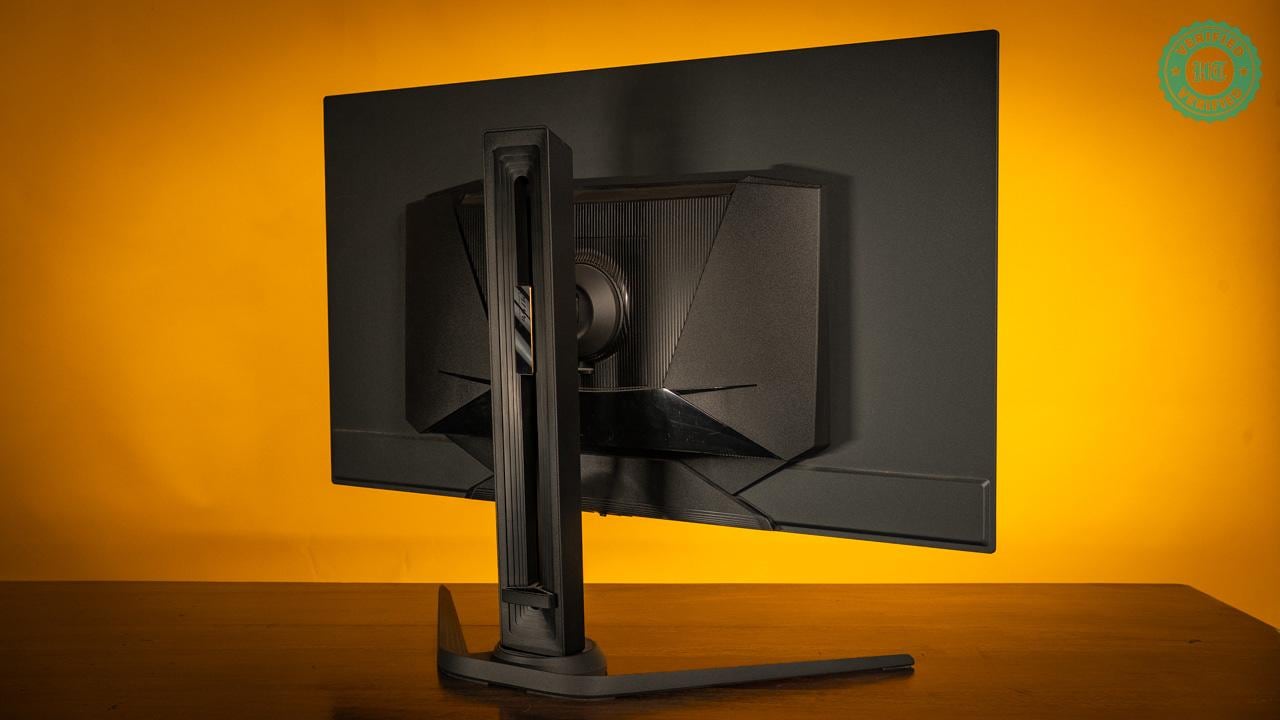
The stand is exceptionally stable and very well designed, but has a large footprint and thick base. The slider, tilt, and rotation mechanisms comfortably handle the weight of the monitor, allowing for easy adjustments of everything except height, which is stiff.
| Spec | Value |
|---|---|
| With Stand (W × H × D) | 718.3 × 613.6 × 158.6 mm |
| Without Stand (W × H × D) | 718.3 × 417.5 × 57.2 mm |
| Box (W × H × D) | 980 × 580 × 190 mm |
| Net Weight with Stand (est.) | 8.53 kg |
| Net Weight without Stand (est.) | 6.2 kg |
| Gross Weight (est.) | 13.2 kg |
In the box
- Power cable
- HDMI 2.1 cable
- miniDP 2.1 cable (VESA DP80)
- USB Type-C cable
- USB-B cable
- Quick Start Guide
- Warranty card
- Colour calibration report
Colour accuracy: Class-leading performance
How we tested
Colour accuracy testing was conducted with an i1Display Pro Plus colorimeter and DisplayCAL 3.9. The monitor was reset to factory defaults and tested in both the 'Standard' and 'sRGB' modes. Power-saver modes and HDR were disabled, and the monitor was allowed 30 minutes to warm up before testing commenced.
Brightness and white point targets were set to 120 nits and 6500K (D65). The former is our recommended brightness target for a comfortable home/office setting, while the latter is the standard colour temperature to which most content is mastered.
Overall, I was very impressed with the monitor's colour accuracy and general colour performance. I recommend putting the monitor in sRGB mode when colour accuracy is critical, and the slightly oversaturated Standard mode when gaming or consuming content. Note that minor calibration is needed for colour-critical work, and that the monitor responds very well to calibration.
The FO32U2P offers other colour profiles such as Racing, MOBA, Movie, and Reader, but I feel that most users will be well served with Standard, while professionals will stick to sRGB.
Colour space
| Measurement | Result |
|---|---|
| sRGB (Standard mode) | 100% |
| DCI-P3 (Standard mode) | 97.5% |
| Adobe RGB (Standard mode) | 91% |
| sRGB (sRGB mode) | 99% |
In Standard mode the monitor covers 100% of sRGB, 97.5% of DCI-P3, and 91% of the Adobe RGB colour space. sRGB coverage was 96% in sRGB mode after calibration.
This is excellent coverage for professional photographers, designers and the like, and the near-100% DCI-P3 coverage means that connected Macs can render images with full wide-gamut support.
Out-of-the-box accuracy
At factory defaults, both the sRGB and Standard modes ran at a slightly warmer 6300K. To my eyes, the Standard mode was a bit oversaturated, while sRGB was more accurate but slightly washed out. While the FO32U2P offers six-axis control and myriad sliders for fine-tuning colour, it does not allow you to tweak contrast or gamma values in the more accurate sRGB mode, which was a touch disappointing.
| Measurement | Result |
|---|---|
| Average ΔE, Standard & sRGB | < 0.3 |
| Factory white point | 6300K |
Out-of-the-box accuracy in both Standard and sRGB modes was excellent. Both modes offered an average ΔE of under 0.3, matching Gigabyte's claims.
What is ΔE?
ΔE measures the difference between expected colour values and measured ones. A value below 2 indicates that any differences are so small as to be indistinguishable to the human eye. Most monitors average a value between 2 and 5, so a value of 0.3 for the FO32U2P indicates that colours are clinically accurate.
The only concern was gamma, which was not stable from pure black to pure white in Standard mode. The difference was minor, however, and I feel it is only significant to professional colour graders and artists. There were no such issues in sRGB mode, and gamma values remained very stable.
Calibration with a colorimeter easily addressed the saturation and gamma issues in Standard mode, as well as the slightly washed-out look of sRGB mode.
Near-black and high-luminance performance (9.5/10)
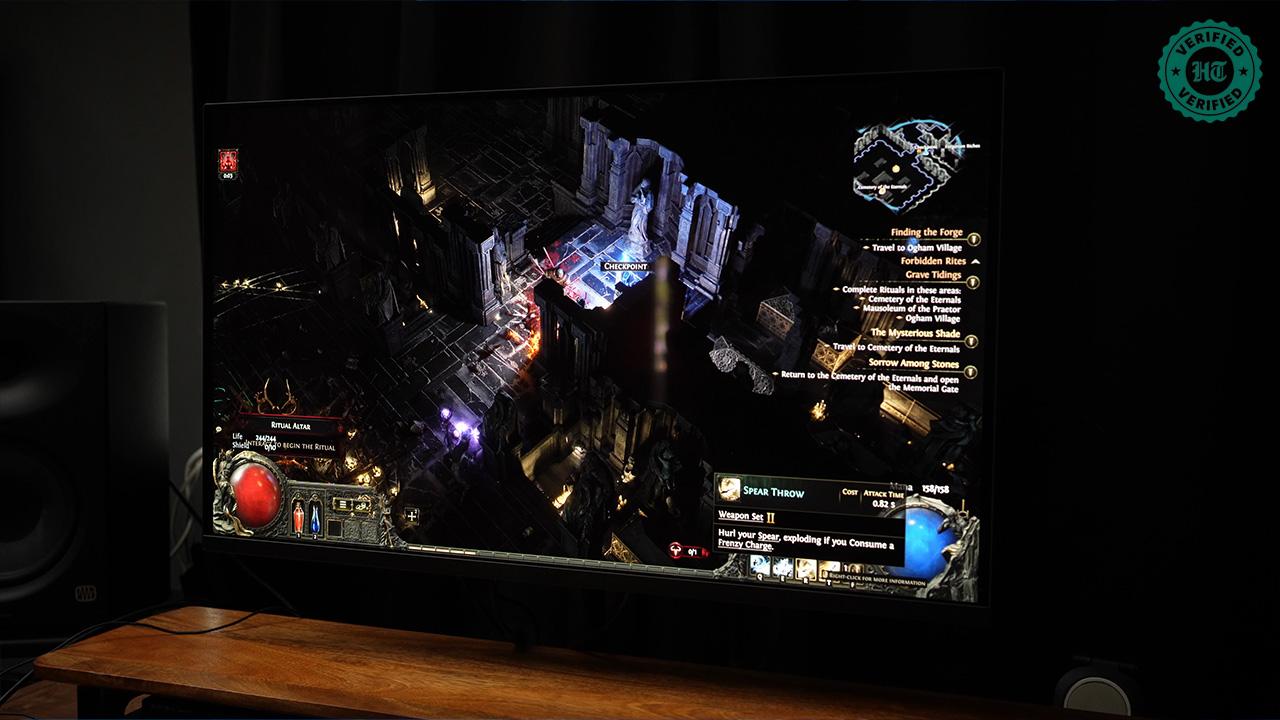
As with all OLED displays, near-black performance is superb. Tiny gradations in black and grey levels are readily apparent, allowing dark scenes to show more shadow detail and texture.
The same is true at maximum brightness, as OLED's near-infinite contrast allows tiny gradations in white to show through clearly.
Screen uniformity
Neither my eyes nor the colorimeter could discern any significant variation in corner-to-corner screen uniformity. This is as expected from a high-quality QD-OLED panel.
Viewing angles
Being an OLED panel, viewing angles were, as expected, excellent.
HDR performance
The FO32U2P only supports the HDR10 standard and not Dolby Vision, which is disappointing for content consumption. That said, the monitor does not get bright enough for an accurate HDR presentation, with most modes maxing out at 400 nits at a 3% APL. The HDR Vivid mode can push 1,000 nits but does not look very good.
What is APL?
APL, or Average Picture Level, indicates how bright the whole screen is on average. 100% APL is full white; 0% APL is pure black.
Another issue with HDR is flicker, where the monitor will sometimes rapidly, but not smoothly, dim areas of the screen to boost brightness in others. This is distracting when it happens — usually when transitioning from a dark room to a bright one — but isn't a common enough occurrence to be grating.
From my testing, HDR appears to offer the best uplift in open-world games such asDeath Stranding andForza, where lighting is more consistent, but is problematic in games likeCall of Duty that have a lot of flashing lights. The same applies to movies, where fast-paced scenes suffer from flicker while more sedate ones look great.
OLED in general offers near-unlimited contrast, so disabling HDR isn't much of a loss to begin with.
The unstable brightness and lower colour accuracy of the HDR modes mean that the display isn't suited to HDR video-editing workflows.
Reflectivity & glare
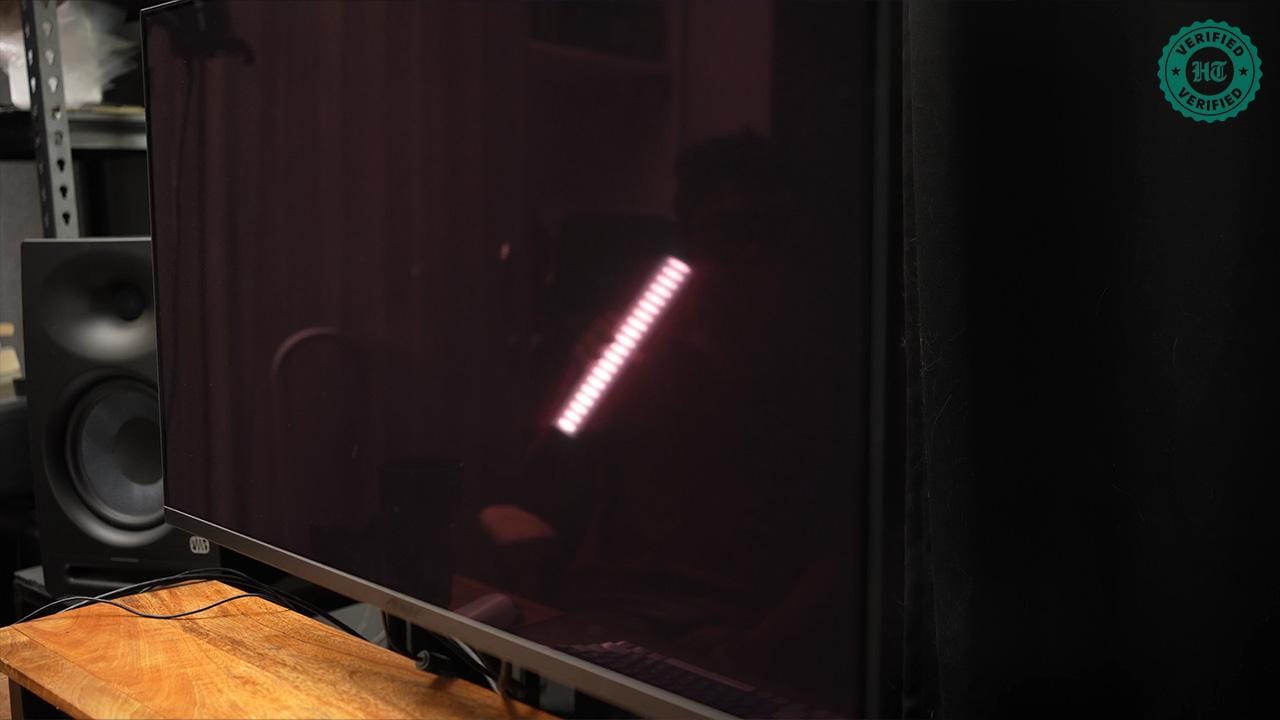
The Gigabyte FO32U2P uses a glossy panel that is highly reflective and suffers from a strong magenta tint under bright light. My only advice here is to use the monitor in a relatively dark room.
Note that the tint is a by-product of QD-OLED technology, and almost all QD-OLED panels suffer from the issue. Newer panels have an additional coating on top to prevent this tint.
Motion & text clarity: One of the sharpest OLED panels around
Motion blur
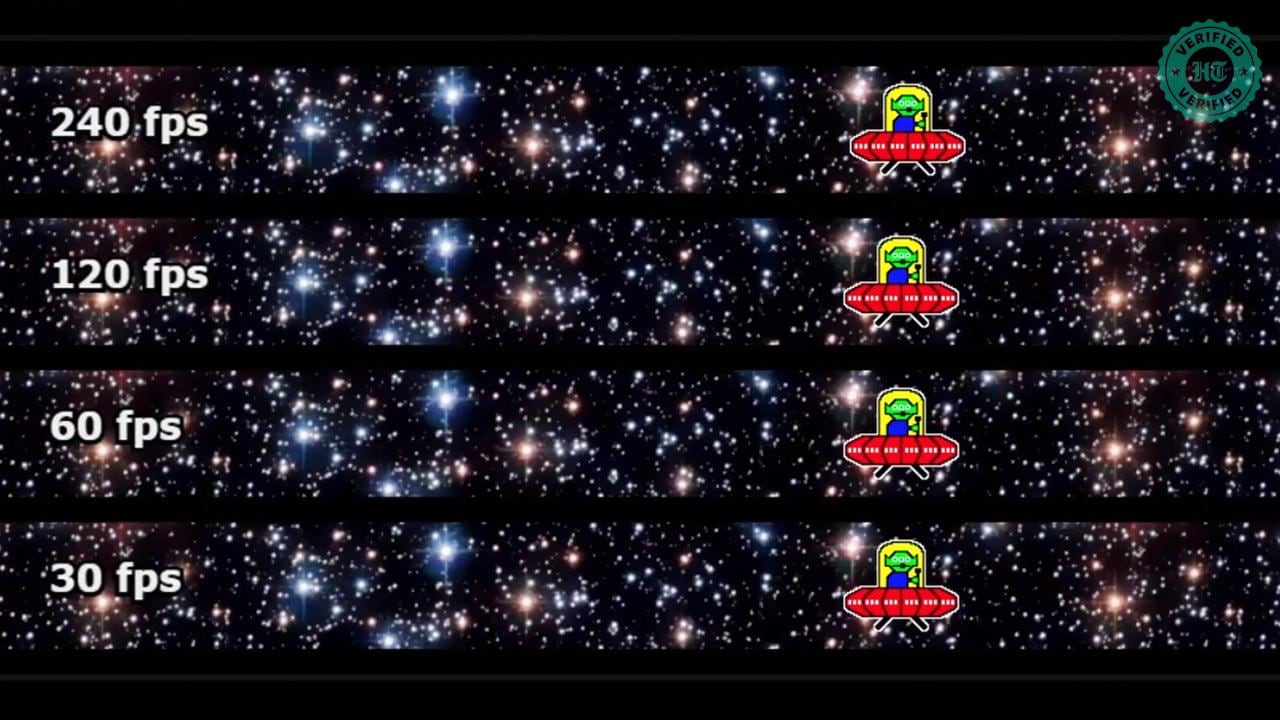
OLED pixels have a near-instantaneous response time — the time it takes a pixel to transition from one colour to another — which is perfect for gaming. 240 Hz is also quite fast.
The combination of these specs — OLED tech and a 240 Hz refresh rate — results in next to no perceivable blur in content running at 240 Hz. Motion clarity is far superior to that of a 240 Hz LED monitor and comparable to a 360 Hz or faster esports monitor. Professional esports monitors still have an edge thanks to features like black frame insertion, but for regular gamers the FO32U2P is plenty fast.
Text clarity
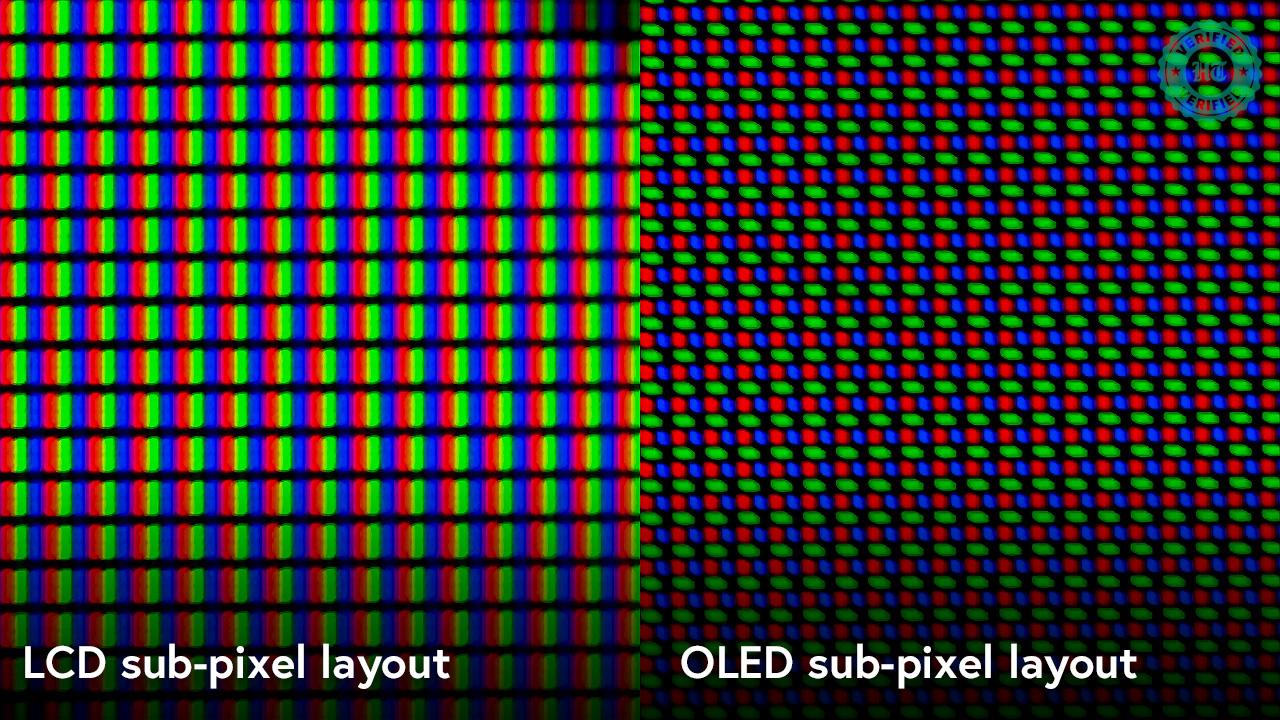
Owing to a subpixel layout that differs from LCDs, OLED displays tend to have poor text clarity and show purple fringing around the edges of sharp fonts.
The Gigabyte FO32U2P uses the denser, slightly different subpixel layout of third-generation OLED tech to deliver much sharper text with little to no fringing. You'll definitely see fringing if you go looking for it, but in my opinion this is one of the sharpest OLED panels you can buy. Do note that any display with a third-generation or later OLED panel will deliver similar text clarity.
Burn-in mitigation: Industry-standard features
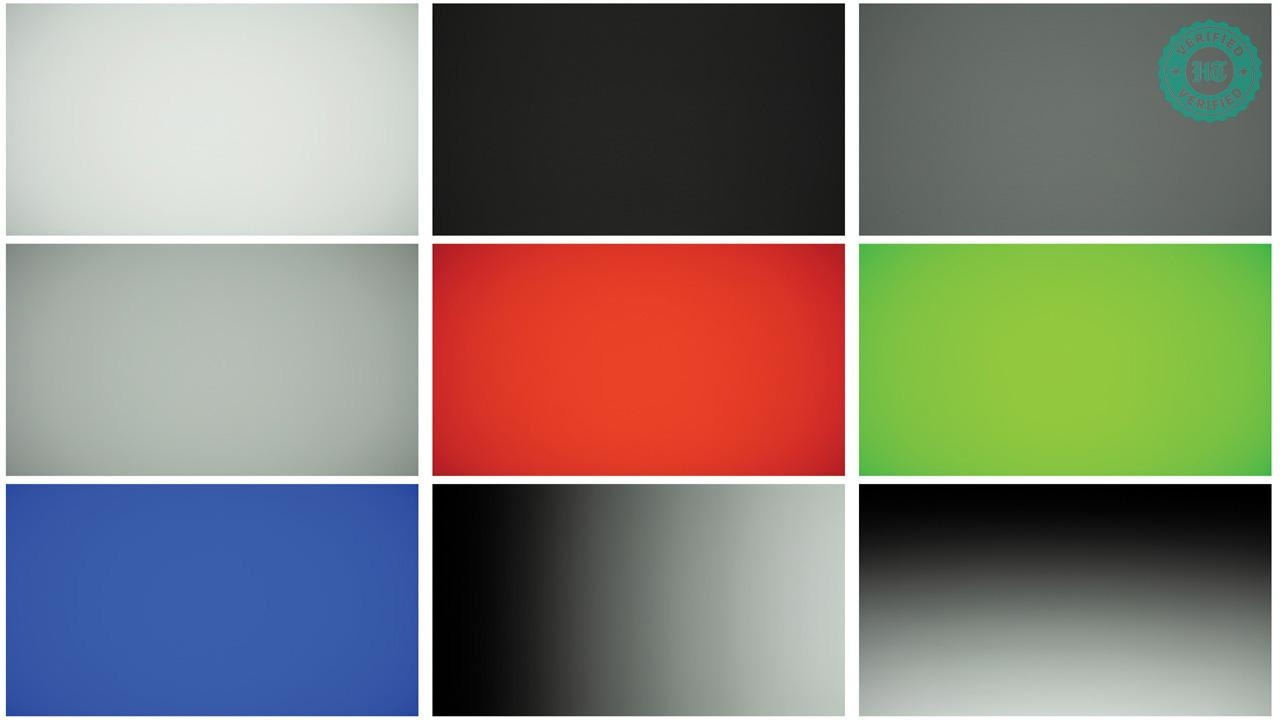
Gigabyte includes a standard suite of features to mitigate burn-in. These include:
- Pixel Clean: Pixels are completely reset and power-cycled every few hours, and a test is run to recalibrate brightness and colour levels.
- Pixel Shift: The entire 4K image is moved a few pixels in any direction. For this, the monitor has excess pixels around all edges.
- APL stabilisation, logo dimming, and corner dimming: Algorithms that dynamically adjust the overall brightness level, as well as brightness in the corners and wherever static content such as logos is detected.
- Gigabyte's 3-year warranty covers burn-in
I've used this monitor as my primary display for nearly two years. The monitor was almost always set to 120 nits (half of the maximum brightness) and persistent screen elements such as the Windows taskbar were set to auto-hide where possible. All recommended OLED Care features were left enabled and at their factory default settings. The primary use for this monitor was gaming and content consumption, but it has also been used extensively for writing and video editing.
As you can see from the images above (taken with a Sony A7 IV in pitch darkness), there is no sign of burn-in after 6-8 hours of daily use for over two years.
A note on burn-in
All OLED monitors will suffer burn-in at some point in their lifespan. OLED pixels degrade with use and over time stop rendering colours accurately. This becomes apparent as burn-in, where the structure and colour of static content such as the Windows taskbar or Chrome menu appears to be 'burnt in' to the display. This damage is inevitable and permanent.
Pros:
- Exceptional colour accuracy
- Superb stand
- Excellent motion clarity
- Text clarity is very good for OLED tech
- No visible burn-in after 2 years of use
Cons:
- Limited HDR support
- Height adjustment is stiff
Verdict: Competitive pricing and class-leading performance (9.5/10)
The Gigabyte FO32U2P offers exceptional colour accuracy and responds well to calibration. The panel quality is excellent, response time is superb, and features like a KVM switch and daisy-chaining are nice to have. Burn-in was non-existent after two years, which was a pleasant surprise. DP2.1 support is nice to have but largely superfluous as it offers no tangible benefit, while HDR support is more limited than I would like.
The monitor was originally priced at ₹1,26,190 two years ago but its current price of ₹87,000 is very competitive, and in fact lower than that of many similarly specced monitors. Panel performance is on par with other monitors in the same class, so when given a choice between other third-generation, 32-inch QD-OLED monitors, the choice will primarily come down to features and price rather than panel quality, where I feel that the FO32U2P has an edge.
Review unit purchased from Vedant Computers for ₹1,26,190 in October 2024.
Monitor evaluation
| Test Area | Rating (/10) |
|---|---|
| Best-in-class connectivity and I/O thanks to USB 3.2 and DP2.1 support | 9.5 |
| Sturdy stand with good flexibility. Height adjustment is stiff, however. | 8.5 |
| Colour gamut includes DCI-P3 support | 9.5 |
| Factory calibration is near perfect, requiring minor calibration only | 9.5 |
| Excellent near-black performance | 9.5 |
| Excellent screen uniformity with no visible variation | 10 |
| Minimal to no quality loss at extreme viewing angles | 9.5 |
| Limited HDR support with low max HDR brightness and coverage | 6.5 |
| Highly reflective glossy panel with strong magenta tint | 6.5 |
| Excellent motion response | 9 |
| Superb text clarity for an OLED panel | 8.5 |
| Excellent value-for-money at current MSRP | 9 |
| Overall rating | 8.8 |

You may be interested in

68% OFF
GIGABYTE GS27QA 27" SS IPS Display, 180Hz, 2560 x 1440 (QHD), 1ms (MPRT) Response Time, 100% sRGB, HDR Ready, Flicker-Free, Black
 GIGABYTE GS27QA 27" SS IPS Display
- 180Hz
- 2560 x 1440 (QHD)

₹14,199
₹45,000Check Details
74% OFF
GIGABYTE G25F2A 24.5-Inch FHD IPS Gaming Monitor, 240Hz, 1ms, AMD FreeSync Premium, HDR Ready, Ergonomic Stand, Eye-Safe Gaming Display
- GIGABYTE G25F2A 24.5-Inch FHD IPS Gaming Monitor
- 240Hz
- 1ms
₹11,999
₹45,999Check Details

GIGABYTE GS22F12I 21.5" FHD VA 120Hz Monitor with 1ms MPRT, 4000:1 Contrast, 109% sRGB, 95% DCI-P3, HDMI & VGA
- GIGABYTE GS22F12I 21.5" FHD VA 120Hz Monitor with 1ms MPRT
- 4000:1 Contrast
- 109% sRGB
₹15,000
Check Details
26% OFF

Acer SA272U P1 27 Inch WQHD (2560x1440) IPS Ultra Slim Monitor | 144Hz Refresh Rate | 1ms VRB | HDR10 | AMD FreeSync | HDMI 2.0 + DisplayPort 1.4 | Built-in Dual Speakers | VisionCare | Black
- Acer SA272U P1 27 Inch WQHD (2560x1440) IPS Ultra Slim Monitor | 144Hz Refresh Rate | 1ms VRB | HDR10 | AMD FreeSync | HDMI 2.0 + DisplayPort 1.4 | Built-in Dual Speakers | VisionCare | Black
₹11,888
₹15,999Check Details
21% OFF

BenQ MA320UP (Smartchoice) 32” (81.28 cm) 4K IPS Nano Gloss Monitor for Mac®, 3840x2160, 60Hz, 97% P3, Dual USB-C 90W/15W PD, Mac Colors,550 nits, Mac Controls, Ergonomics,3W x2 Speakers (Gray)
- BenQ MA320UP (Smartchoice) 32” (81.28 cm) 4K IPS Nano Gloss Monitor for Mac®
- 3840x2160
- 60Hz
₹56,999
₹72,500Check Details
38% OFF

ASUS ProArt PA32QCV 32 Inch 6K DCI-P3 Thunderbolt 4 Monitor for Mac | Calman Verified, 98% DCI-P3, Delta E<2, LuxPixel AGLR, MacBook Color Match, Auto KVM, DisplayHDR 600, Ergonomic Stand
- ASUS ProArt PA32QCV 32 Inch 6K DCI-P3 Thunderbolt 4 Monitor for Mac | Calman Verified
- 98% DCI-P3
- Delta E<2
₹1,55,990
₹2,50,000Check Details
19% OFF

BenQ MA320U, 32Inch (68.58 cm), 4K IPS 3840x2160, 60Hz, Monitor for Mac®,97% P3 Color Gamut,99% sRGB, HDMI, Dual USB-C(90W PD),HAS Stand,Display Pilot2.0, 3WX2 Speakers,Integrated Mac® Controls(Gray)
- BenQ MA320U
- 32Inch (68.58 cm)
- 4K IPS 3840x2160
₹52,490
₹65,000Check Details
44% OFF

LG 32U631A-B 32-inch QHD (2560 x 1440) IPS Computer Monitor, 100Hz, 5ms, HDR10, Reader Mode, Flicker Safe, HDMI, USB Type-C 15W PD, Black
- LG 32U631A-B 32-inch QHD (2560 x 1440) IPS Computer Monitor
- 100Hz
- 5ms
₹22,590
₹39,999Check Details
40% OFF

Samsung 32" (80cm) 2K ViewFinity S6 Monitor|QHD 2560 X 1440|IPS|Type-C 90W|SRGB 99%|LAN Port|KVM Switch|350nits|Daisy Chain|PIP|PBP|HDR10|Easy Setup Stand|HAS Pivot Adjustable|LS32D604UAWXXL|Black
- Samsung 32" (80cm) 2K ViewFinity S6 Monitor|QHD 2560 X 1440|IPS|Type-C 90W|SRGB 99%|LAN Port|KVM Switch|350nits|Daisy Chain|PIP|PBP|HDR10|Easy Setup Stand|HAS Pivot Adjustable|LS32D604UAWXXL|Black
₹29,899
₹50,000Check Details
36% OFF

Acer KA270 P6 27 Inch IPS Full HD Backlit LED Monitor I 144Hz Refresh Rate, 1MS VRB, AMD FreeSync I 99% sRGB I 1 x VGA 1 x HDMI with Inbox HDMI Cable I Zero Frame Design I Eye Care I Stereo Speakers
- Acer KA270 P6 27 Inch IPS Full HD Backlit LED Monitor I 144Hz Refresh Rate
- 1MS VRB
- AMD FreeSync I 99% sRGB I 1 x VGA 1 x HDMI with Inbox HDMI Cable I Zero Frame Design I Eye Care I Stereo Speakers
₹10,800
₹16,999Check Details
80% OFF

Zebronics Full HD LED Monitor, 21.5 Anti-Glare Screen, 100Hz Refresh Rate, Ultra Slim, Bezel-Less Display, 250nits Brightness, HDMI & VGA, Wall Mountable (A122)
- Zebronics Full HD LED Monitor
- 21.5 Anti-Glare Screen
- 100Hz Refresh Rate
₹4,699
₹22,999Check Details
54% OFF

Dell SE2725HG 27" FHD IPS Gaming Monitor, 200Hz Refresh, 3side narrow bezels, 1ms GtG, AMD FreeSync Premium, HDR 10, 300nits, 1000:1 Contrast, 99% Srgb, Tilt, 2*HDMI 2.1 TDMS(supports HDMI VRR),DP 1.4
- Dell SE2725HG 27" FHD IPS Gaming Monitor
- 200Hz Refresh
- 3side narrow bezels
₹9,999
₹21,729Check Details
68% OFF

FRONTECH 20-inch (50.8 cm), LED, HD 1600x900, 60Hz, Black, Wall Mountable Slim & Stylish Design, 16.7M Colors, HDMI & VGA Ports, Built-in Power Supply Monitor, 1 Year Warranty (MON-0054)
- FRONTECH 20-inch (50.8 cm)
- LED
- HD 1600x900
₹2,574
₹8,000Check Details
27% OFF

Samsung 27" Odyssey QD-OLED G6 Gaming Monitor(Smartchoice) | QHD 2560 x 1440| 240 Hz| 0.03ms | Ergonomic Stand | Pantone Validated| Glarefree | TrueBright 300| G-Sync| Free Sync| LS27HG612SWXXL| Black
- Samsung 27" Odyssey QD-OLED G6 Gaming Monitor(Smartchoice) | QHD 2560 x 1440| 240 Hz| 0.03ms | Ergonomic Stand | Pantone Validated| Glarefree | TrueBright 300| G-Sync| Free Sync| LS27HG612SWXXL| Black
₹46,899
₹63,900Check Details
28% OFF

Acer SmartChoice SA242Y E 23.8 Inch Full HD IPS Monitor I 100Hz Refresh Rate I 1ms VRB I AMD FreeSync I Ultra Slim ZeroFrame Design I VisionCare I HDMI & VGA Inbox HDMI Cable I VESA Mount I Black
- Acer SmartChoice SA242Y E 23.8 Inch Full HD IPS Monitor I 100Hz Refresh Rate I 1ms VRB I AMD FreeSync I Ultra Slim ZeroFrame Design I VisionCare I HDMI & VGA Inbox HDMI Cable I VESA Mount I Black
₹6,088
₹8,499Check Details
23% OFF

Lenovo Legion 27Q-10 | 27" (68.58cm) QHD IPS 240Hz Gaming Monitor | 0.5ms, AMD FreeSync, NVIDIA G-Sync 99% sRGB, 2xHDMI 2.1 TMDS, 1xDP 1.4| Tilt, Swivel, Pivot, Height Adjust | Black | 68C6GAC4IN
- Lenovo Legion 27Q-10 | 27" (68.58cm) QHD IPS 240Hz Gaming Monitor | 0.5ms
- AMD FreeSync
- NVIDIA G-Sync 99% sRGB
₹18,299
₹23,790Check Details
25% OFF

LG 32UN880K 32" (81.28cm) 3840x2160 Pixels Ultrafine Display Ergo UHD 4K IPS Display with HDR 10 Compatibility and USB Type-C Connectivity, Tilt/Height/Swivel/Pivot/Extend/Retract, Black
- LG 32UN880K 32" (81.28cm) 3840x2160 Pixels Ultrafine Display Ergo UHD 4K IPS Display with HDR 10 Compatibility and USB Type-C Connectivity
- Tilt/Height/Swivel/Pivot/Extend/Retract
- Black
₹44,900
₹59,999Check Details
20% OFF

BenQ GW2486TC 24inch (60.45cm) IPS 100Hz Full HD Coding Monitor |USB-C(65W PD)| Daisy Chain| 99% sRGB| Height Adjust|HDMI| DP| USB Hub| 2Wx2 Speakers| Eye Care| Noise Cancelling Microphone (White)
- BenQ GW2486TC 24inch (60.45cm) IPS 100Hz Full HD Coding Monitor |USB-C(65W PD)| Daisy Chain| 99% sRGB| Height Adjust|HDMI| DP| USB Hub| 2Wx2 Speakers| Eye Care| Noise Cancelling Microphone (White)
₹15,990
₹19,990Check Details
64% OFF

ZEBRONICS Zeb-V19Hd 18.5 Inch (46.99 Cm) Led Monitor with Supporting Hdmi, Vga Input, Hd 1366 X 768 Pixels, 16.7M Colors, Glossy Panel, Slim Design & Wall Mountable, Black
- ZEBRONICS Zeb-V19Hd 18.5 Inch (46.99 Cm) Led Monitor with Supporting Hdmi
- Vga Input
- Hd 1366 X 768 Pixels
₹2,499
₹6,999Check Details
Stay updated with the latest Technology News, gadget launches, app updates, artificial intelligence and digital trends. Find reviews, comparisons and useful insights from the world of tech.


