
 E-Paper



CISF head constable recruitment 2019: Application begins today, here’s how to apply
CISF head constable recruitment 2019 application begins today. Visit the official website cisfrectt.in.


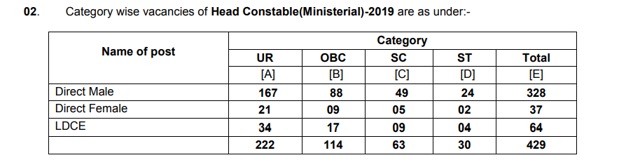
Application for head constable in Central Industrial Security Force (CISF) has been started from January 21, 2019. CISF has invited applications for 429 vacant posts of head constable through its official notification. The last date to apply is February 20, 2019.

Candidates can apply online through the official website at cisf.gov.in. This will be temporary posts of head constable (Ministerial) in CISF in the level-4 in pay matrix (Rs. 25500 – Rs. 81100) Pre revised Pay Rs. 5200-20200 with Grade pay of Rs. 2400/- plus usual and admissible allowances to the Central Government employees from time to time.
Candidates who are 10+2 (intermediate) pass can apply for the posts. There will be three levels of recruitment before medical examination , namely, PST and documentation, OMR or CBT written exam, skill or typing test.
The online application must be submitted in their concerned CISF. Check your regional centres (CISF) in the official notification given below.
CISF Recruitment 2019: How to apply
1. Online application will be accepted at CISF website cisfrectt.in only.
2. Log on to the official website of CISF at cisfrectt.in.
3.Click on ‘Register/Login button’.
4. If you are a new user, click on ‘Register’ tab and fill the registration details- candidate’s name, father’s name, candidate’s date of birth, candidate’s gender and the verification Text.
5. Click submit to proceed further
If you are already registered, you need not register again.
6. Enter ‘personal Details’, Basic Details’ and ‘Contact Details’ as appeared.
7. Enter all required field and then click on ‘submit’ button.
On successful completion of registration process, you will receive provisional Registration ID and password on your registered e-mail ID & mobile number to upload your photograph and signature. You can also upload your photograph and signature at your convenience at later date/time by logging in again using the provisional ID & password clicking ‘View/Edit Registration’ option which is displayed under new registration.


