
 E-Paper



6 Health and fitness features on the Apple Watch you might be missing to stay fit every day
Here’s how you can use your Apple Watch’s built-in health and fitness tools to start and maintain your personal wellness journey today.

 Prefer HTon Google


You may be interested in
Apple Watch SE 3 GPS 44mm Starlight Aluminium Case with Starlight Sport Band - M/L
 Apple Watch SE 3 GPS 44mm Starlight Aluminium Case with Starlight Sport Band - M/L

₹28,900
Check Details

1% OFF

Apple Watch Series 11 GPS 46mm Jet Black Aluminium Case with Black Sport Band - M/L
- Apple Watch Series 11 GPS 46mm Jet Black Aluminium Case with Black Sport Band - M/L
₹49,399
₹49,900Check Details

Apple Watch SE 3 GPS 40mm Midnight Aluminium Case with Midnight Sport Band - M/L
- Apple Watch SE 3 GPS 40mm Midnight Aluminium Case with Midnight Sport Band - M/L
₹25,900
Check Details

Technology is becoming an important part of personal health management, and the Apple Watch stands out as a useful companion for anyone starting a wellness journey. Apple has focused on building health tools into its smartwatch that help users track fitness, monitor vital signs, and stay aware of their overall well-being. From simple heart rate monitoring to advanced ECG and cycling analytics, the device offers a range of features that make everyday health tracking more accessible.
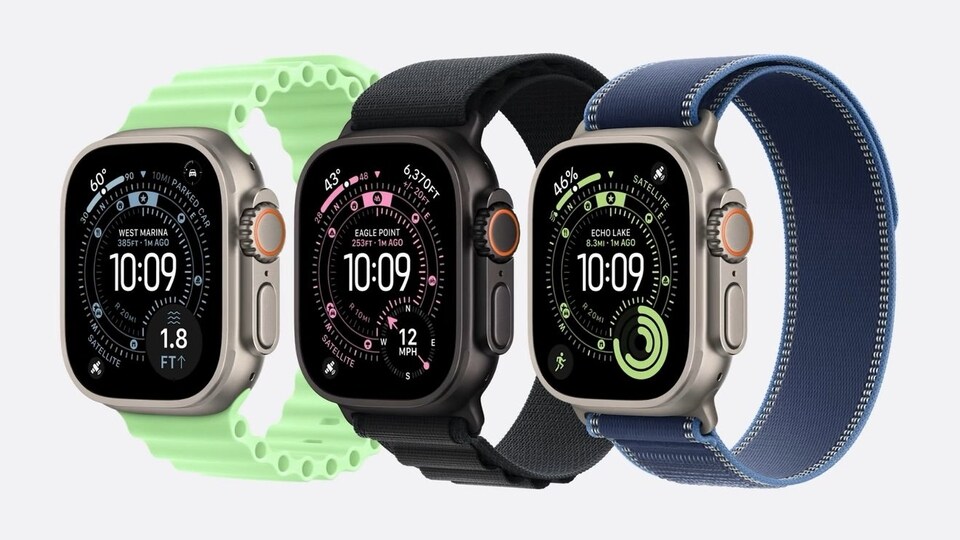

Apple continues to expand these tools through regular watchOS updates. With watchOS 10, features like Live Activity for cyclists, compass upgrades for hikers, mood tracking, and outdoor light exposure monitoring were introduced. The watchOS 26 update added hypertension alerts and a redesigned Workout app, making it easier for users to manage their wellness data.
Also read: iQOO 15 set to launch in India in November with new ‘Dynamic Glow’ interface - All details
Before exploring these tools, users should ensure their Apple Watch is updated. This can be done through the Watch app on an iPhone by selecting General > Software Update, or directly on the watch under Settings > General > Software Update.
1. Access Your Health Profile
The Health app allows users to store personal health data such as blood type, gender, medical history, and medications. These details appear under Settings > Health > Health Details > Medical ID on the watch. Users can edit this information anytime, which ensures it remains accurate and useful in emergencies.
Also read: Xiaomi 17 vs iPhone 17: Design, performance, camera, battery, and price compared
2. Record and Customise Workouts
The Workout app offers a variety of activities, including yoga, martial arts, and dance. Users can set goals for time, calories, or distance, and even build custom workouts. Music can be added for motivation through the Autoplay Media feature. Subscribers to Apple Fitness+ can also access guided workouts and meditation sessions directly from the watch.
3. Use Compass Waypoints for Hiking
The updated Compass app in watchOS 10 helps hikers stay oriented by automatically creating waypoints, showing elevation data, and marking the last known cellular or emergency call location. Offline maps from iOS 18 can now be downloaded and synced to the watch for better navigation.
Also read: Jio launches corporate JioFi plans: Free router, data benefits, and more
4. Track Cycling in Real Time
Cyclists can use Live Activity to view real-time metrics such as heart rate, distance, elevation, and time on their iPhone’s Lock Screen or Dynamic Island. This helps riders stay informed without stopping mid-ride.
5. Monitor Heart Health
The Heart Rate app records data throughout the day, displaying averages and ranges. It helps users spot unusual patterns. Third-party apps like HeartWatch or Cardiogram offer expanded insights.
Also read: Goodbye Twitter.com: X sets deadline for users to secure their accounts
6. Take an ECG
Users with an Apple Watch Series 4 or later can take an electrocardiogram (ECG) at any time by placing a finger on the Digital Crown. The app records the heart’s rhythm and alerts users to irregularities such as atrial fibrillation.
These features collectively make the Apple Watch a helpful tool for building and maintaining healthy habits through continuous monitoring and easy access to wellness insights.


