
 E-Paper



I tested printers for document printing, and these are the models I would trust for everyday work
From school assignments to office paperwork, these printers focus on sharp text, easy maintenance and lower running costs.

 Prefer HTon Google


Our Picks
Best overall
Budget friendly
Portable printer
FAQs
Our Picks
| Product | Rating | Price |
|---|---|---|
Best overall HP Smart Tank 589 All-in-One WiFi Colour Printer |Up to 4000 Black & 6000 Colour Prints I Print,Scan & Copy for Home/OfficeView Details | ||
 | ||
Budget friendly Canon PIXMA TS207 Print Only Non WiFi Inkjet Colour Printer for Home, Upto 100 Black and 100 Colour PrintsView Details | ₹2,525 | |
| ||
Portable printer BEEKAY Portable A4 Direct Thermal Printer, USB + Bluetooth, Inkless Thermal Printer USB for Computer, Bluetooth with Android iOS Mobile 1 Year Warranty Black - 203 DPIView Details | ₹5,999 | |
| ||
SEZNIK Portable A4 Printer, Bluetooth, Inkless for Professionals,Travel | Mini Printer | USB, Bluetooth Printer Compatible with Android iOS Laptop | 1 Year Warranty (Pro-HD304dpi-Black)View Details | ₹9,998 | |
| ||
Brother Ink Tank DCP-T535DW New Launch (Print Scan Copy) WiFi Auto Duplex Printer, 128MB Memory, Print Pages Upto 15K in Black & 5K in Color Each (CMY) Get an Extra Black Ink Bottle, Free InstallationView Details | ₹16,899 | |
| ||

Research-Backed Choices
Every product we recommend is chosen through a combination of Primary Research and Secondary Research.

Printing documents at home or in a small office can quickly become frustrating when ink runs out frequently, text looks faded or running costs start adding up. A printer that works well for photographs may not necessarily be the right choice for pages of reports, assignments, invoices or other paperwork.
I looked at printers with document printing in mind, focusing on the things that matter during regular use. Sharp text, economical ink usage, easy connectivity and hassle free maintenance can make a bigger difference than having a long list of extra features. Here are the models worth considering if most of your printing involves everyday documents.
BEST OVERALL
1. HP Smart Tank 589 All-in-One WiFi Colour Printer |Up to 4000 Black & 6000 Colour Prints I Print,Scan & Copy for Home/Office
The HP Smart Tank 589 is an all in one ink tank printer designed for home and small office use. It supports printing, scanning and copying, with WiFi connectivity for convenient wireless printing. The refillable ink system is rated for up to 4,000 black and 6,000 colour pages, making it suitable for regular document printing. It also supports borderless printing and mobile printing through the HP app, AirPrint and Mopria, although duplex printing is manual.
Specifications
Reasons to buy

High ink yield keeps running costs manageable.
WiFi and mobile printing are convenient.
Reason to avoid

Duplex printing is manual.
Colour printing is relatively slow.
What are buyers saying?
Buyers generally praise the print quality, easy setup and low running costs. The printer has a strong overall rating, although some users mention connectivity and occasional setup issues.
Why you should choose this product?
Choose the Smart Tank 589 if you need an affordable all in one printer for regular home or small office printing with wireless connectivity and high ink yields.
BUDGET FRIENDLY
2. Canon PIXMA TS207 Print Only Non WiFi Inkjet Colour Printer for Home, Upto 100 Black and 100 Colour Prints

Our Principles
Full Transparency
Every product review clearly lists the Pros and Cons, giving you a balanced view.
Brand Confidence
We focus on products from brands with a proven reputation and long-standing market trust.
The Canon PIXMA TS207 is a compact single function colour inkjet printer designed for light home printing. It uses conventional cartridges and connects to a computer through USB rather than WiFi. The printer supports A4 documents and borderless 4x6-inch photo printing, while its scratch resistant textured exterior helps maintain a clean appearance. With a recommended monthly volume of only 10 to 80 pages, it is better suited to occasional printing than demanding workloads.
Specifications
Reasons to buy
Compact design suits small desks.
Supports borderless photo printing.
Reason to avoid
No WiFi connectivity.
Low recommended monthly print volume.
What are buyers saying?
The TS207 is generally appreciated for its compact design, simple operation and low initial cost. Buyers looking for occasional printing tend to find its straightforward USB setup useful.
Why you should choose this product?
Choose the TS207 if you only need occasional colour documents or photos and want a simple, compact printer without paying extra for scanning, copying or wireless features.
PORTABLE PRINTER
3. BEEKAY Portable A4 Direct Thermal Printer, USB + Bluetooth, Inkless Thermal Printer USB for Computer, Bluetooth with Android iOS Mobile 1 Year Warranty Black - 203 DPI
The BEEKAY Portable A4 Direct Thermal Printer is designed for users who need document printing while travelling or working away from a desk. Its inkless thermal technology eliminates traditional cartridges, while USB and Bluetooth connectivity allow printing from computers and mobile devices. The 203 DPI resolution is suited to text documents, forms, notes and basic graphics. Its compact portable design makes it particularly useful for professionals, students and field workers who need quick A4 prints without carrying a conventional printer.
Specifications
Reasons to buy
Inkless operation eliminates cartridge replacement.
USB and Bluetooth offer flexible connectivity.
Reason to avoid
Thermal prints require compatible paper.
203 DPI is not ideal for detailed graphics.
What are buyers saying?
Feedback around this type of portable A4 thermal printer focuses on convenience, portability and avoiding ink cartridges. Users generally value it for documents, while image quality is more limited.
Why you should choose this product?
Choose it if portability matters more than colour printing and you frequently need quick A4 documents while travelling, working remotely or handling paperwork away from an office.
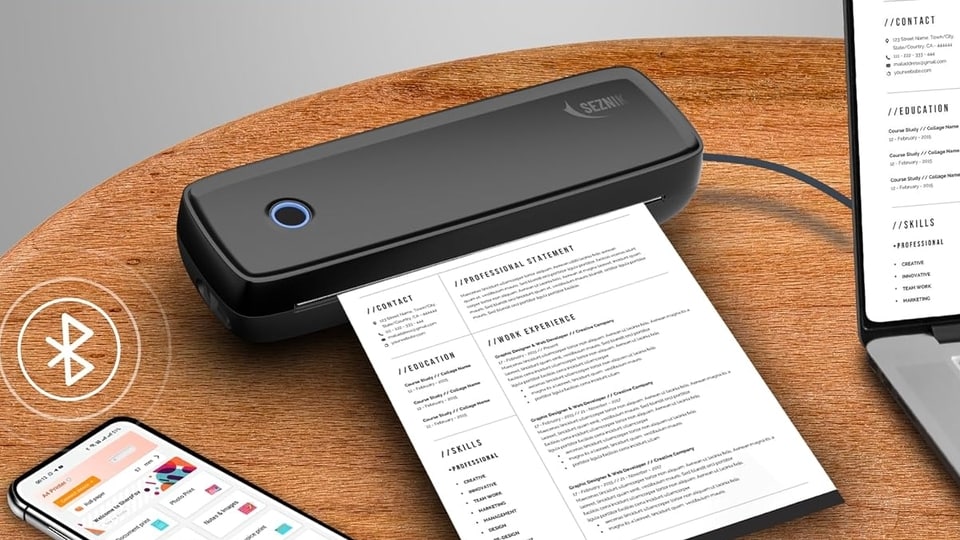
4. SEZNIK Portable A4 Printer, Bluetooth, Inkless for Professionals,Travel | Mini Printer | USB, Bluetooth Printer Compatible with Android iOS Laptop | 1 Year Warranty (Pro-HD304dpi-Black)
The SEZNIK Pro HD is a portable A4 thermal printer designed for professionals who need document printing outside a traditional office. Its 304 DPI resolution offers sharper text and graphics than many entry level 203 DPI thermal printers. Bluetooth and USB connectivity support Android, iOS and laptop devices, while the inkless design removes the need for conventional cartridges. The compact format makes it suitable for travel, field work, temporary offices and professionals who regularly print documents away from home.
Specifications
Reasons to buy
Higher 304 DPI resolution produces sharper output.
Portable design suits travel and field work.
Reason to avoid
Thermal paper is required.
No conventional colour printing.
What are buyers saying?
Available feedback is generally positive about its portability, wireless printing and sharp output. Buyers looking for a travel printer appreciate the inkless design, although thermal paper remains an added requirement.
Why you should choose this product?
Choose the SEZNIK Pro HD if you want a portable A4 printer with sharper 304 DPI output and Bluetooth connectivity for printing documents directly from phones and laptops.
The Brother DCP T535DW is an all in one ink tank printer designed for home offices and small businesses. It supports printing, scanning and copying, while dual band WiFi, WiFi Direct and USB provide multiple connectivity options. Automatic duplex printing is particularly useful for reducing paper consumption. The printer offers up to 15,000 black and 5,000 colour pages from the included ink, along with a 150-sheet front loading tray and a compact design.
Specifications
Reasons to buy
Automatic duplex printing saves paper.
Very high black ink yield.
Reason to avoid
Mobile setup can be slightly confusing.
Some users report paper feeding issues.
What are buyers saying?
Buyers largely praise its print quality, automatic duplex feature, wireless connectivity and low running costs. Some users, however, report occasional paper feeding and mobile connectivity problems.
Why you should choose this product?
Choose the DCP T535DW if you print frequently and want low running costs, automatic duplex printing, wireless connectivity and high page yields for home or small office use.
6. Canon PIXMA MegaTank G3000 All in One WiFi Ink Tank Colour Printer with Scanner for Home, Upto 6000 Black and 7000 Colour Prints with 2 Additional Black Ink Bottles
The Canon PIXMA MegaTank G3000 is an all in one wireless ink tank printer aimed at high volume home and office printing. It combines printing, scanning and copying with refillable ink tanks designed to reduce running costs. The printer supports WiFi and mobile printing, making it easier to print from phones and computers. Its 6000 black and 7000 colour page yields are suited to regular use, while the flatbed scanner handles A4 documents and everyday copying tasks.
Specifications
Reasons to buy
Refillable tanks keep ink costs low.
WiFi enables convenient wireless printing.
Reason to avoid
Colour printing is relatively slow.
Long periods without use can affect ink systems.
What are buyers saying?
Buyers generally like its print quality, easy refilling, wireless printing and low running costs. Some long term users report maintenance issues when the printer is left unused for extended periods.
Why you should choose this product?
Choose the G3000 if you need an affordable all in one printer for regular home or school printing and want refillable tanks, wireless connectivity and high page yields.
The Brother DCP T236 is a straightforward colour ink tank multifunction printer aimed at home users. It supports printing, scanning and copying, with a 150-sheet paper tray and borderless printing up to A4. The printer can produce up to 7,500 black and 5,000 colour pages from its ink supply, making it suitable for regular household printing. Its USB connection keeps the setup simple, while the compact design makes it practical for desks with limited space.
Specifications
Reasons to buy
High ink yield reduces refill frequency.
150-sheet tray suits regular home printing.
Reason to avoid
No WiFi connectivity.
Some buyers find installation less straightforward.
What are buyers saying?
Buyers generally appreciate the print quality, compact design and value for money. Some users mention that installation requires assistance, while others have reported paper feeding and speed concerns.
Why you should choose this product?
Choose the DCP T236 if you want a high-yield colour ink tank printer for home use and do not need wireless printing or advanced office features.
Factors to consider when buying a printer for document printing
- Print quality: Look for crisp text and clean lines, particularly if you regularly print reports, forms or official documents.
- Running cost: Check the cost and page yield of replacement ink or toner, as this can matter more than the initial printer price.
- Print speed: If you frequently print multiple pages, a faster printer can save considerable time during busy workdays.
- Connectivity: Wi-Fi and mobile printing support make it easier to print documents directly from laptops, smartphones and tablets.
- Maintenance: Consider ink replacement, paper handling and cleaning requirements before choosing a printer for regular use.
Top 3 features of best printer
| Printers | Functions | Print speed | Ink or paper yield |
|---|---|---|---|
| HP Smart Tank 589 | Print, scan, copy | 12 ppm black / 5 ppm colour | 4,000 black / 6,000 colour |
| Canon PIXMA TS207 | Print only | 7.7 ipm black / 4 ipm colour | 100 black / 100 colour |
| BEEKAY Portable A4 | Print only | Not specified | Thermal paper |
| SEZNIK Pro HD | Print only | Not specified | Thermal paper |
| Brother DCP T535DW | Print, scan, copy | 16 ipm black / 9 ipm colour | 15,000 black / 5,000 colour |
| Canon PIXMA G3000 | Print, scan, copy | 8.8 ipm black / 5 ipm colour | 6,000 black / 7,000 colour |
| Brother DCP T236 | Print, scan, copy | 16 ipm black / 9 ipm colour | 7,500 black / 5,000 colour |
Similar articles for you
I compared the top Ink tank and laser printers: Know which one saves you more money in 2026
From assignments to office work: Printers under ₹10,000 that get it done
Invoices taking too long to print? Best portable printers for small businesses
Disclaimer: At Hindustan Times, we help you stay up-to-date with the latest trends and products. Hindustan Times has an affiliate partnership, so we may get a part of the revenue when you make a purchase. We shall not be liable for any claim under applicable laws, including but not limited to the Consumer Protection Act, 2019, with respect to the products. The products listed in this article are in no particular order of priority.



